Many service-based businesses successfully close new clients but lose momentum after the sale because onboarding is manual, scattered, or inconsistent. New clients may not complete intake forms, may delay booking their kickoff call, may miss early check-ins, or may finish the program without being asked for feedback, reviews, or referrals. Without a structured post-sale system, the business risks poor client experience, missed follow-up, weak retention, and unclear visibility into client progress.
Chapter 01 · Featured Case Study
Flagship systems buildClient Onboarding & Retention Automation
I built a flagship portfolio automation system for a financial coaching business that turns post-sale client follow-up into a trackable GoHighLevel lifecycle flow.
CRM AutomationClient OnboardingRetentionClient SuccessEmail/SMS Follow-UpPipeline Tracking
06Documented workflows
08Lifecycle stages
10System areas
13Proof artifacts
Scope counts describe documented implementation coverage, not business performance.
02
Problem and goal
From operational risk to visible system behavior.
The implementation starts with the operating problem, the target behavior, and the system response used to bridge the two.
The goal was to build a client success automation system that helps a financial coaching business guide new clients from enrollment to onboarding, kickoff booking, active program check-ins, manual follow-up when engagement drops, and completion/review follow-up.
Starting condition
Post-sale follow-up depended on manual reminders, scattered client status, and staff memory to keep onboarding, kickoff booking, check-ins, and review requests moving.
Build decision / target behavior
The portfolio-built workflow routes a sample client through visible pipeline states, applies tags, triggers follow-up, and surfaces manual handoff moments for staff review.
03
System architecture
A client lifecycle system from enrollment through retention and review follow-up.
The build connects post-sale onboarding, kickoff booking, active-client check-ins, manual follow-up logic, completion review requests, referral follow-up, pipeline stages, and staff visibility.
Signature system map
Lifecycle workflow map
A compact map of the Brightpath system path from client intake through review/referral follow-up.
- 01
Lead intake
Enrolled-client tag starts the onboarding path.
- 02
Pipeline qualification
Client success opportunity is created or updated.
- 03
Kickoff / onboarding
Form submission moves the client toward kickoff booking.
- 04
Retention follow-up
Check-ins and reply handling keep engagement visible.
- 05
Review / referral
Completion triggers review and referral follow-up.
- 06
Manual handoff
Incomplete or no-response states remain visible to staff.
Journey ↔ CRM state
One progression, two operational views.
A new client enters the system when they are tagged as enrolled inside the CRM. The system sends the onboarding form, creates or updates the client success opportunity, tracks whether onboarding is completed, sends the kickoff booking link, updates the pipeline when the kickoff call is booked, starts active-client check-ins, flags clients who need manual follow-up, and sends review/referral follow-up after completion.
Customer progression
What the customer experiences, including exception handoffs.
- 01Enrolled Client
- 02Onboarding Form Sent
- 03Onboarding Complete
- 04Kickoff Call Booked
- 05Active Program
- 06Check-In Sent
- 07Manual Follow-Up if Needed
- 08Completed / Review Requested
CRM state
The record states staff use to see and manage that progression.
Brightpath Client Success Pipeline
- 01New Client
- 02Onboarding Form Sent
- 03Onboarding Complete
- 04Kickoff Call Booked
- 05Active Program
- 06At Risk / Needs Attention
- 07Completed / Review Requested
- 08Referral Opportunity
Flagship system coverage
The full client lifecycle remains visible.
Lead intake and pipeline state
New clients are tagged, routed into onboarding, and tracked through a client success pipeline.
Kickoff / onboarding flow
Intake, onboarding completion, kickoff booking, and prep messages stay connected.
Retention follow-up checks
Active-client check-ins and reply handling keep engagement visible for staff.
Review / referral path
Completed clients move into review-requested status with follow-up and staff visibility.
System inventory
Connected parts, not equal-weight feature cards.
- 01
Client success pipeline
Tracks each client from enrollment through onboarding, kickoff booking, active program status, attention needed, completion, and referral opportunity.
- 02
Onboarding form
Collects client context before the kickoff call so staff can prepare with the right information.
- 03
Kickoff call calendar
Gives new clients a direct next step after completing onboarding so the first session gets scheduled.
- 04
New client onboarding workflow
Starts when an enrolled-client tag is added, sends the onboarding form, creates tasks, and handles reminders.
- 05
Onboarding form submitted workflow
Updates tags and pipeline status when onboarding is complete, then sends the kickoff booking link.
- 06
Kickoff call booked workflow
Moves the client to the kickoff stage, sends preparation messages, and notifies staff.
- 07
Active client check-in workflow
Sends progress check-ins during the program and flags clients who may need manual follow-up.
- 08
Check-in reply handler
Removes manual follow-up risk when a client responds and notifies staff that engagement is visible.
- 09
Completion/review workflow
Moves completed clients into review-requested status and sends review/referral follow-up.
- 10
Tags and staff notifications
Keeps lifecycle state visible and alerts staff at the moments where a human follow-up matters.
Architecture artifact
System overview
The workflow list shows the connected automations used for onboarding, kickoff booking, active-client check-ins, reply handling, and review/referral follow-up.
System overview proofOpen full size ↗
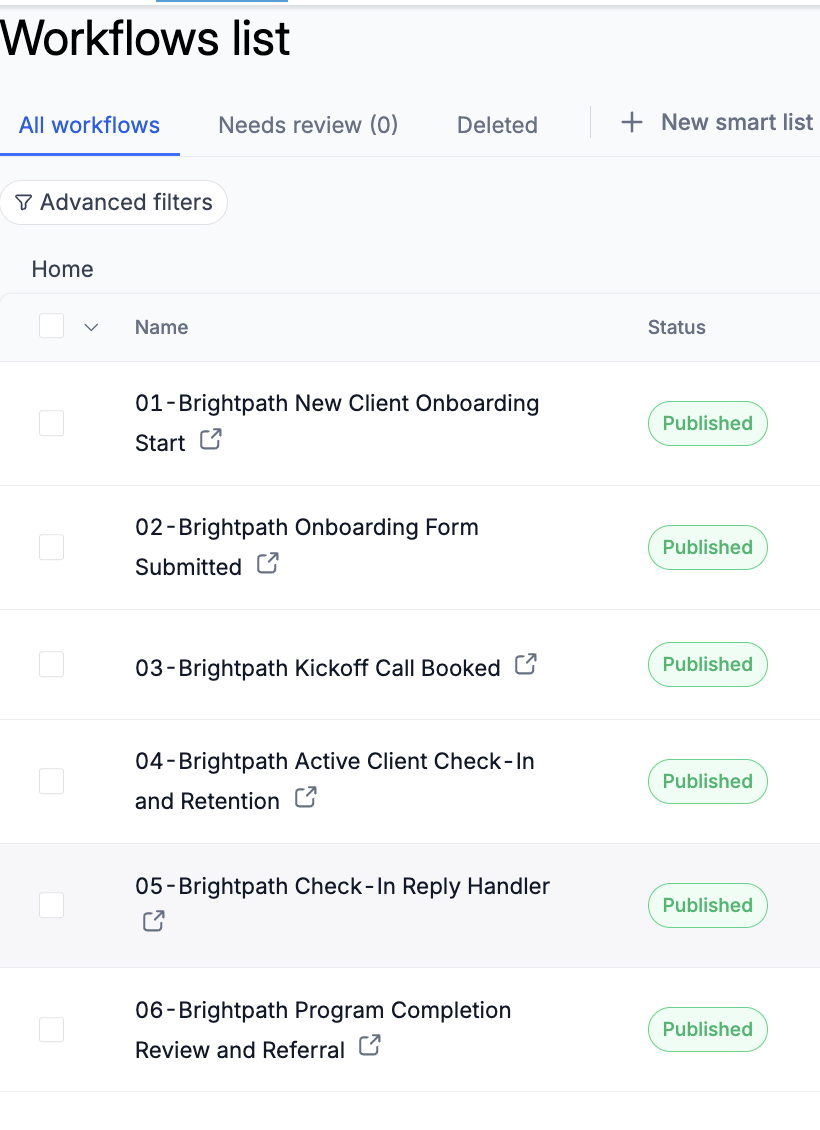
Visible implementation
Shows the published workflow set used for onboarding, kickoff booking, active-client check-ins, reply handling, and review/referral follow-up.
Visible checks
- Portfolio-built workflow set
- Lifecycle stages split into connected automations
- Review/referral follow-up included
04
Key implementation evidence
Decisions paired directly with readable proof.
The workflow cards explain the lifecycle logic; the screenshots trace onboarding, booking, retention, completion, pipeline state, and sample-client QA.
Workflow overview
Six workflows guide the client lifecycle.
The workflows cover enrollment, onboarding completion, kickoff booking, active-client retention, check-in reply handling, and completion review/referral follow-up.
01PurposeWorkflow 01: New Client Onboarding StartTriggerBrightpath enrolled client tag added
Full documented action path
- Add client/onboarding tags
- Create or update the client success opportunity
- Move client to Onboarding Form Sent
- Send onboarding form by email/SMS
- Create internal onboarding review task
- Wait and send reminder if onboarding is not completed
- Flag client for manual follow-up if onboarding remains incomplete
02PurposeWorkflow 02: Onboarding Form SubmittedTriggerBrightpath Client Onboarding Form submitted
Full documented action path
- Add onboarding completed tag
- Remove manual follow-up/risk tags
- Move opportunity to Onboarding Complete
- Send kickoff call booking link
- Notify staff to review onboarding responses
03PurposeWorkflow 03: Kickoff Call BookedTriggerBrightpath Kickoff Call booked
Full documented action path
- Add kickoff booked tag
- Move opportunity to Kickoff Call Booked
- Send kickoff prep email/SMS
- Notify staff to prepare for the session
04PurposeWorkflow 04: Active Client Check-In and RetentionTriggerBrightpath active client tag added
Full documented action path
- Move opportunity to Active Program
- Send active program welcome email
- Wait before first progress check-in
- Send check-in email/SMS
- Add check-in sent tag
- If no response, add needs manual follow-up and notify staff
- Keep the client in Active Program because a missed check-in does not automatically mean they are at risk
05PurposeWorkflow 05: Check-In Reply HandlerTriggerCustomer replies by SMS or email
Full documented action path
- Add check-in responded tag
- Remove needs manual follow-up tag
- Notify staff that the client responded
06PurposeWorkflow 06: Program Completion Review and ReferralTriggerBrightpath completed tag added
Full documented action path
- Move opportunity to Completed / Review Requested
- Add review requested tag
- Send completion/review request by email/SMS
- Wait for response
- Send reminder if needed
- Notify staff if no review response is received
04.1
New-client onboarding control
Inspect decisions and requirements
New client onboarding workflow
Starts when an enrolled-client tag is added, sends the onboarding form, creates tasks, and handles reminders.
What this proves
The onboarding workflow starts the post-sale journey, sends intake steps, and flags incomplete onboarding for manual review.
Primary evidenceOpen full size ↗
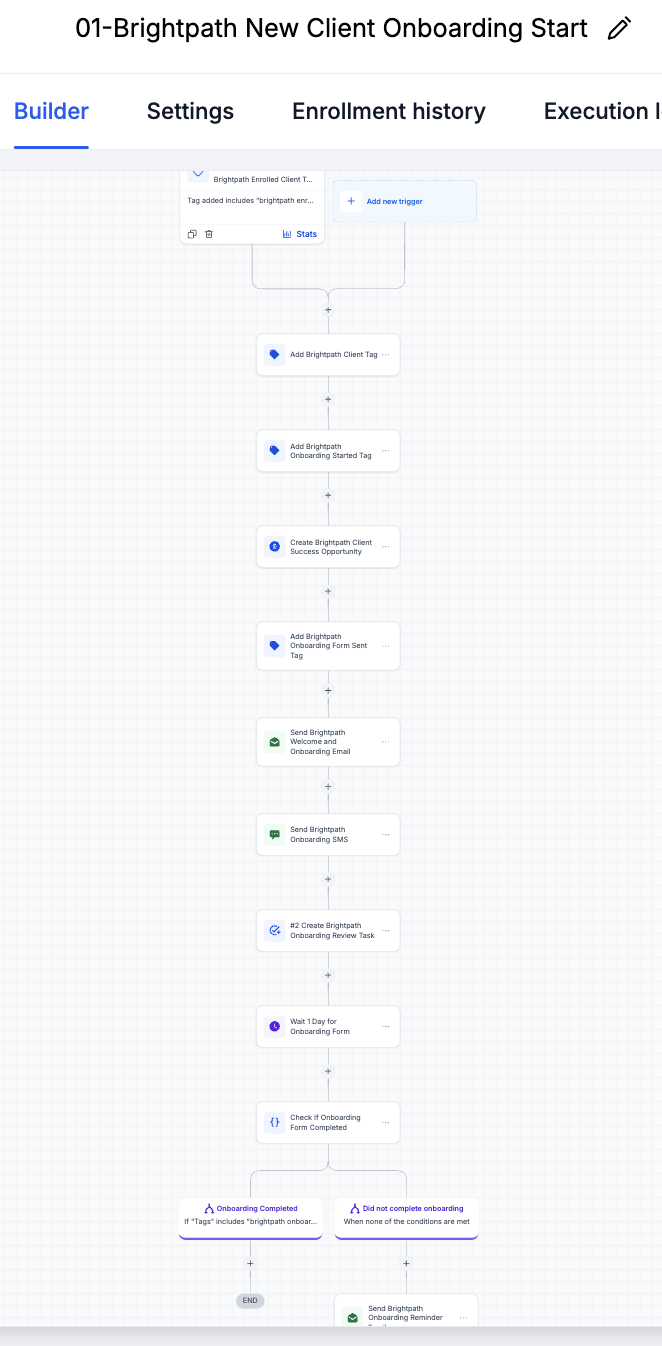
Visible implementation
Shows the onboarding workflow starting when a new enrolled-client tag is added.
Supporting evidenceOpen full size ↗
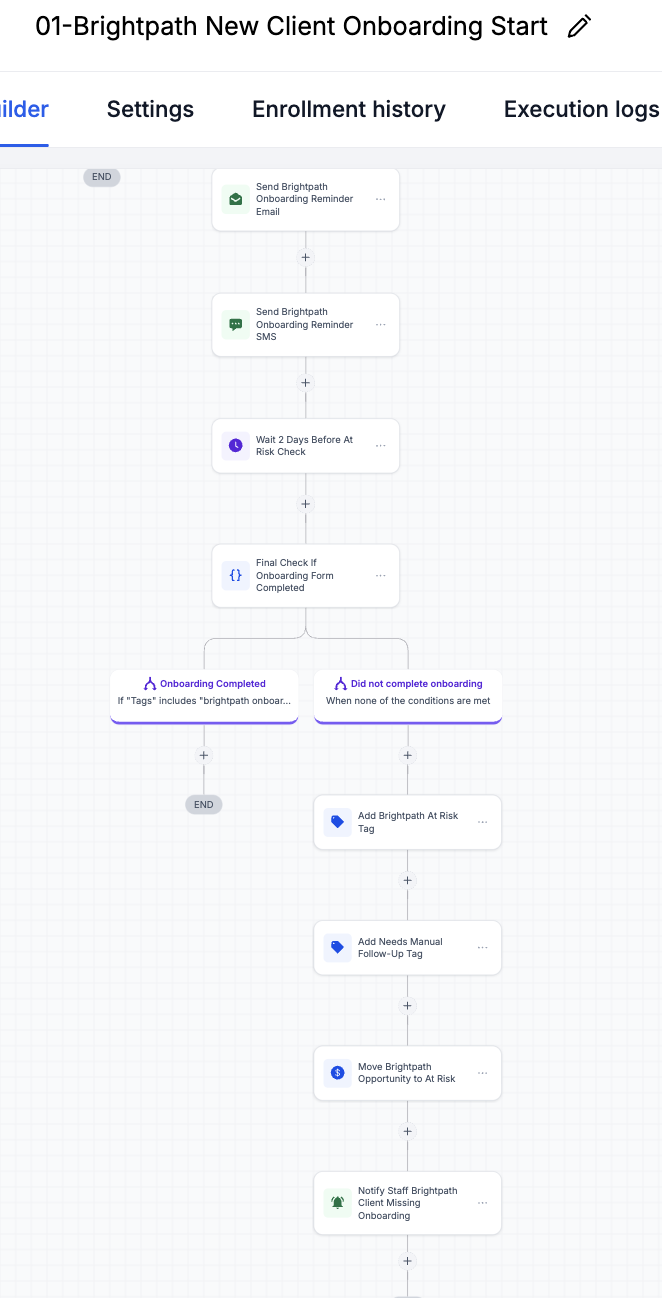
Visible implementation
Shows reminder and manual follow-up logic when onboarding is not completed.
04.2
Onboarding data to kickoff booking
Inspect decisions and requirements
Onboarding form
Collects client context before the kickoff call so staff can prepare with the right information.
Onboarding form submitted workflow
Updates tags and pipeline status when onboarding is complete, then sends the kickoff booking link.
Kickoff call calendar
Gives new clients a direct next step after completing onboarding so the first session gets scheduled.
Kickoff call booked workflow
Moves the client to the kickoff stage, sends preparation messages, and notifies staff.
What this proves
This set proves that onboarding data, form submission, kickoff booking, and prep communication are connected.
Primary evidenceOpen full size ↗
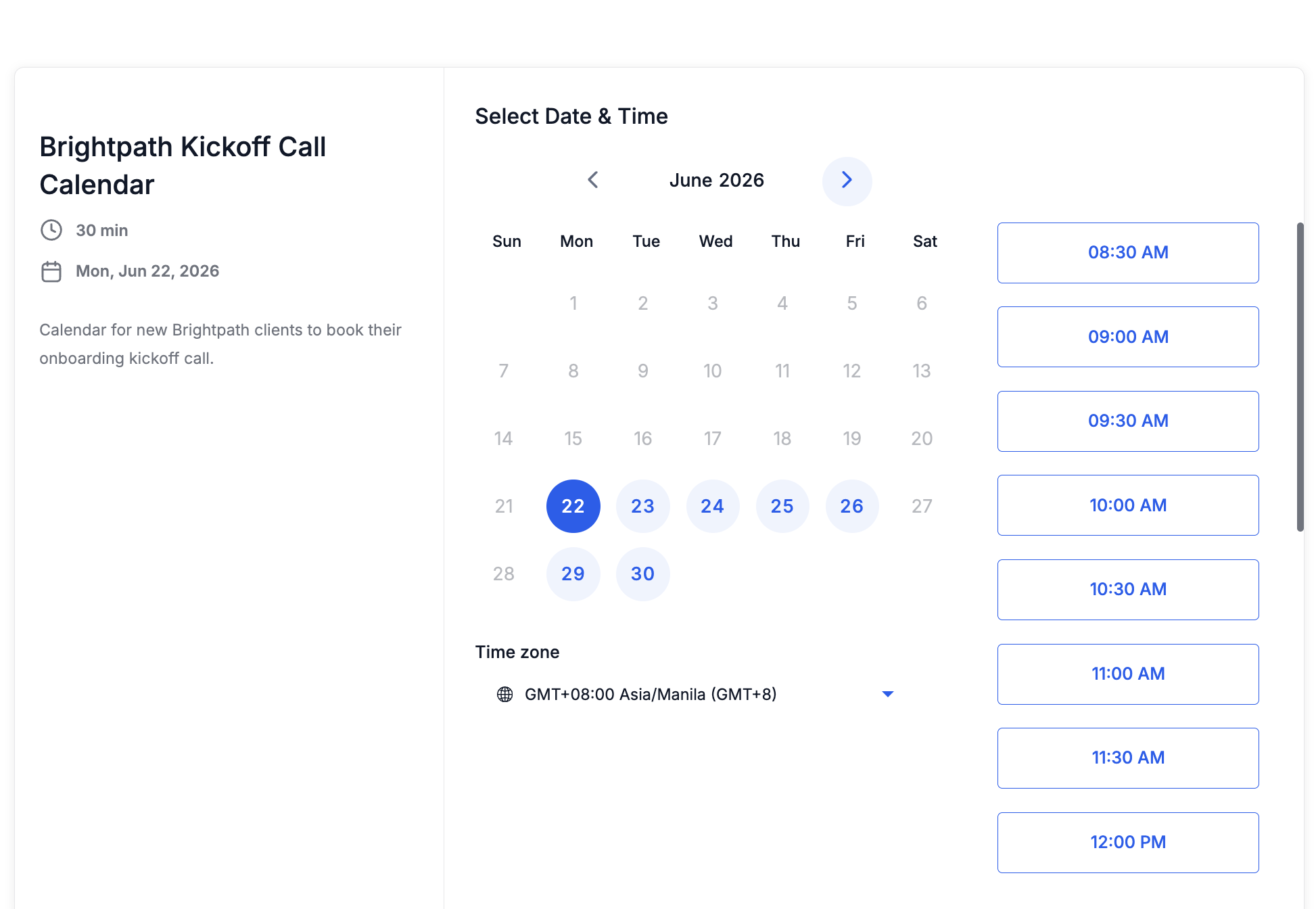
Visible implementation
Shows the kickoff calendar where a new client can schedule the first session.
Supporting evidenceOpen full size ↗
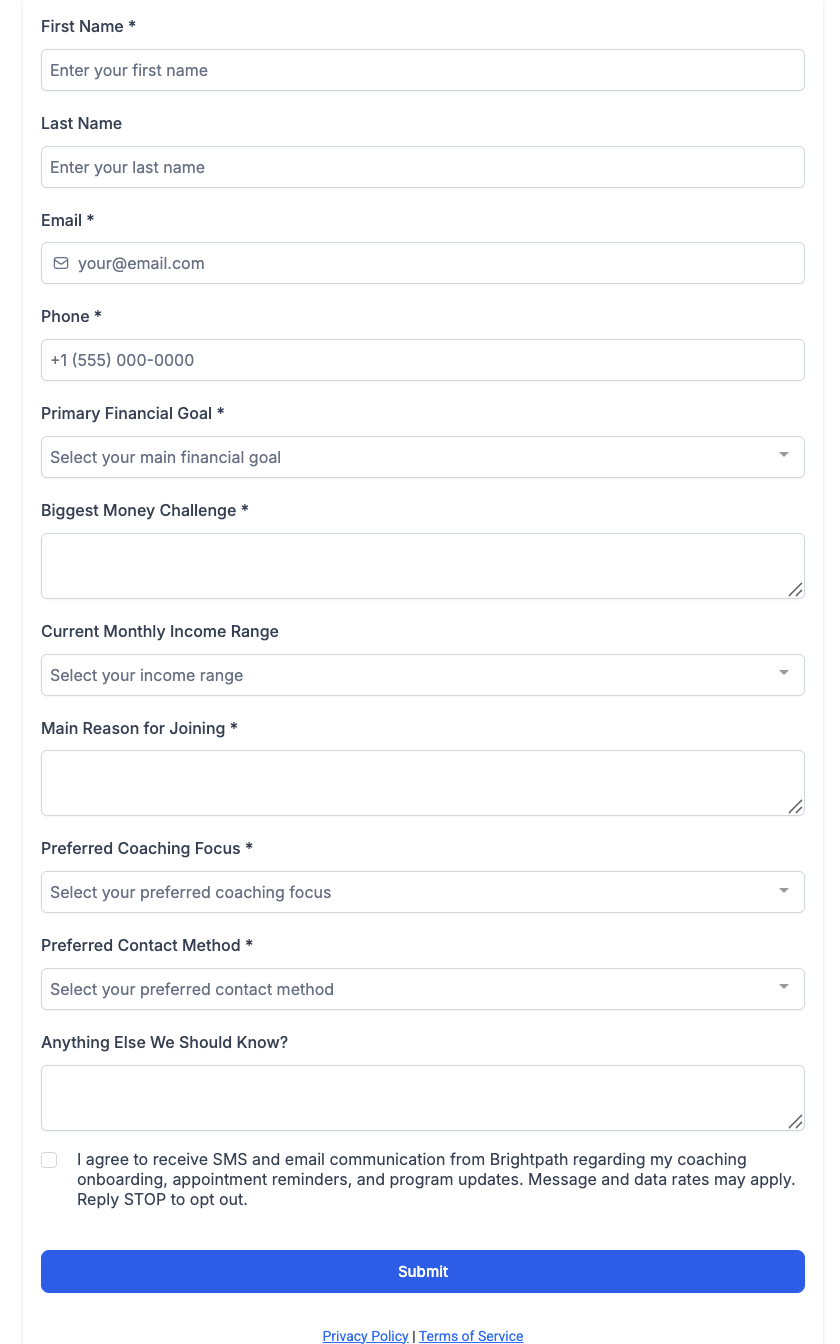
Visible implementation
Shows the onboarding form used to collect client context before the kickoff call.
Supporting evidenceOpen full size ↗
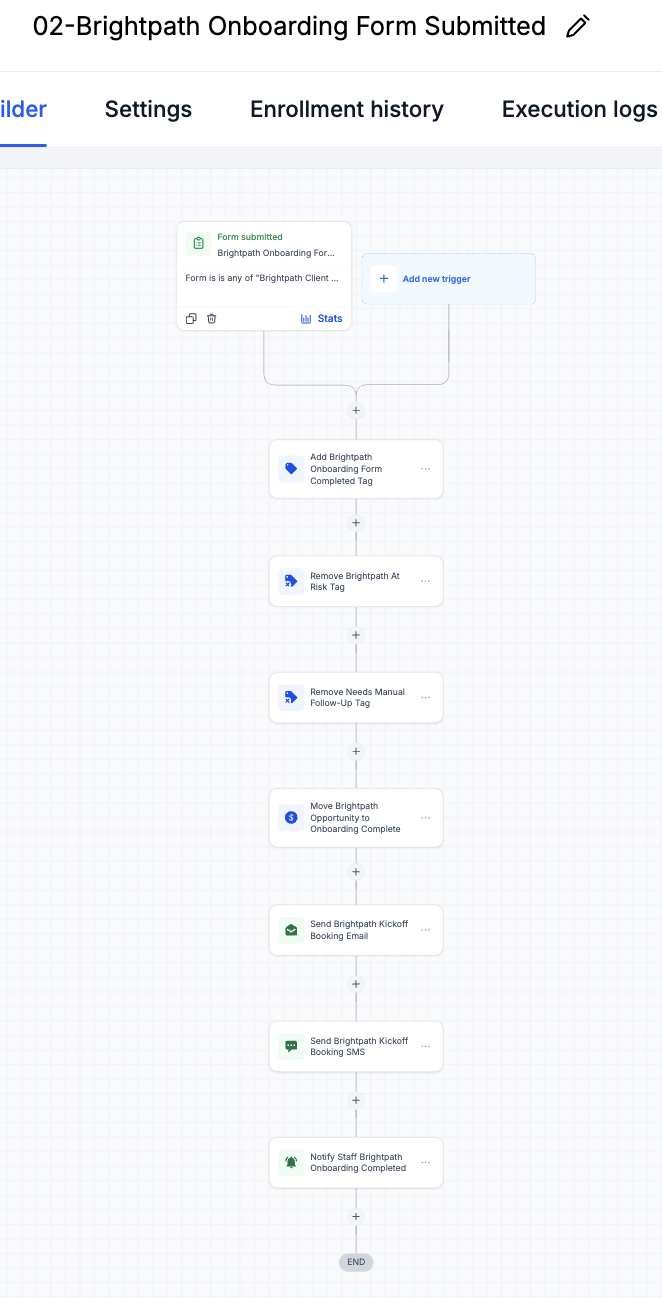
Visible implementation
Shows how form submission updates tags, pipeline status, and staff visibility.
Visible checks
- Onboarding submitted trigger
- Pipeline stage updated
- Staff notification visible
Supporting evidenceOpen full size ↗
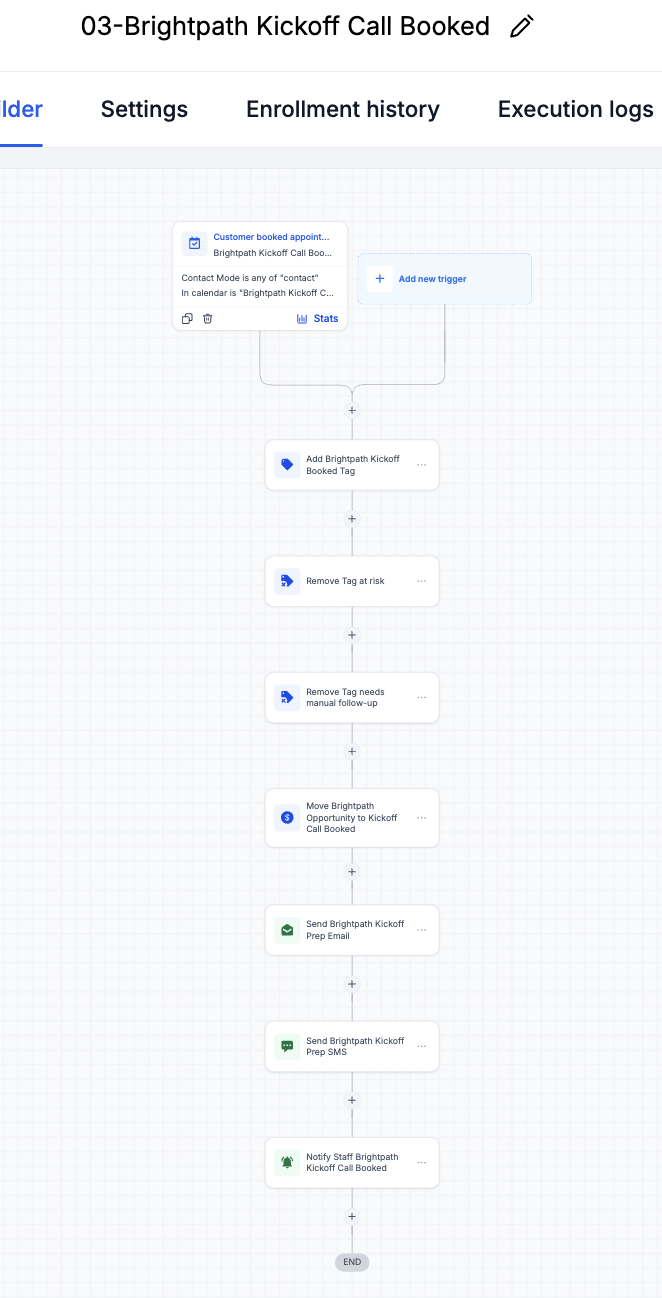
Visible implementation
Shows how kickoff booking updates the pipeline and triggers prep communication.
04.3
Retention checks and reply handling
Inspect decisions and requirements
Active client check-in workflow
Sends progress check-ins during the program and flags clients who may need manual follow-up.
Check-in reply handler
Removes manual follow-up risk when a client responds and notifies staff that engagement is visible.
What this proves
These workflows keep active-client engagement visible and reduce manual guessing when a client misses a check-in.
Primary evidenceOpen full size ↗
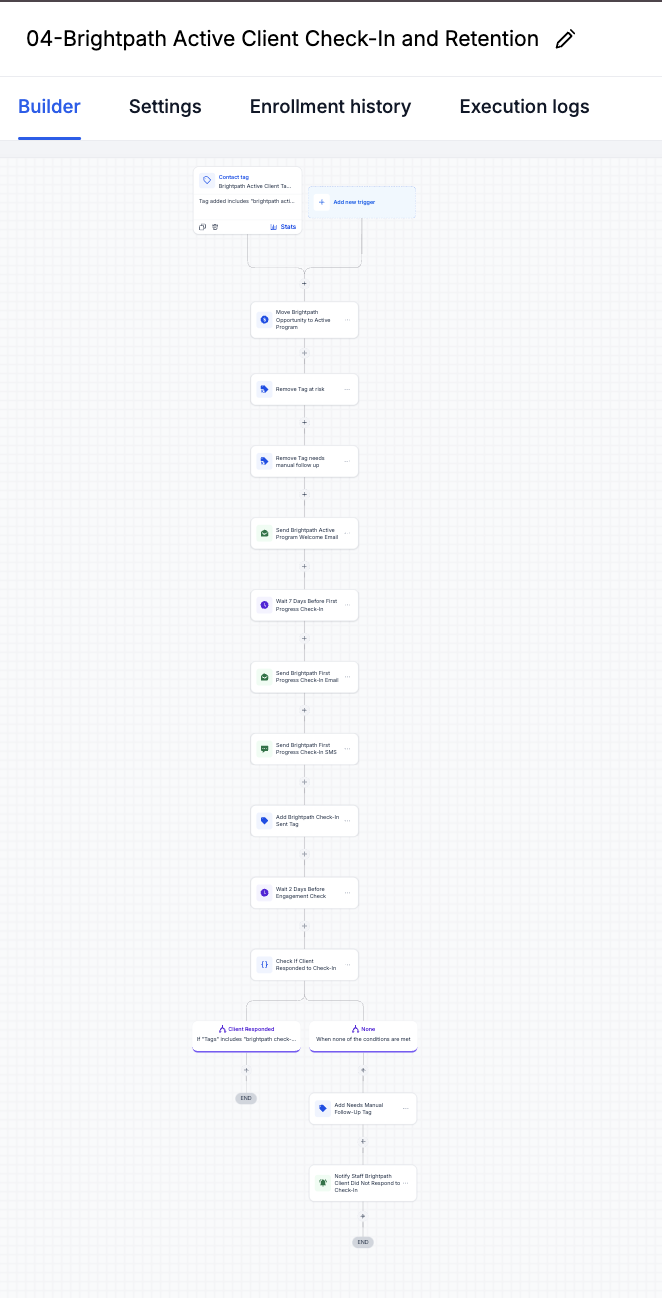
Visible implementation
Shows the active-client check-in workflow used to keep client engagement visible.
Visible checks
- Retention check-in path
- No-response branch reviewed
- Manual follow-up flag
Supporting evidenceOpen full size ↗
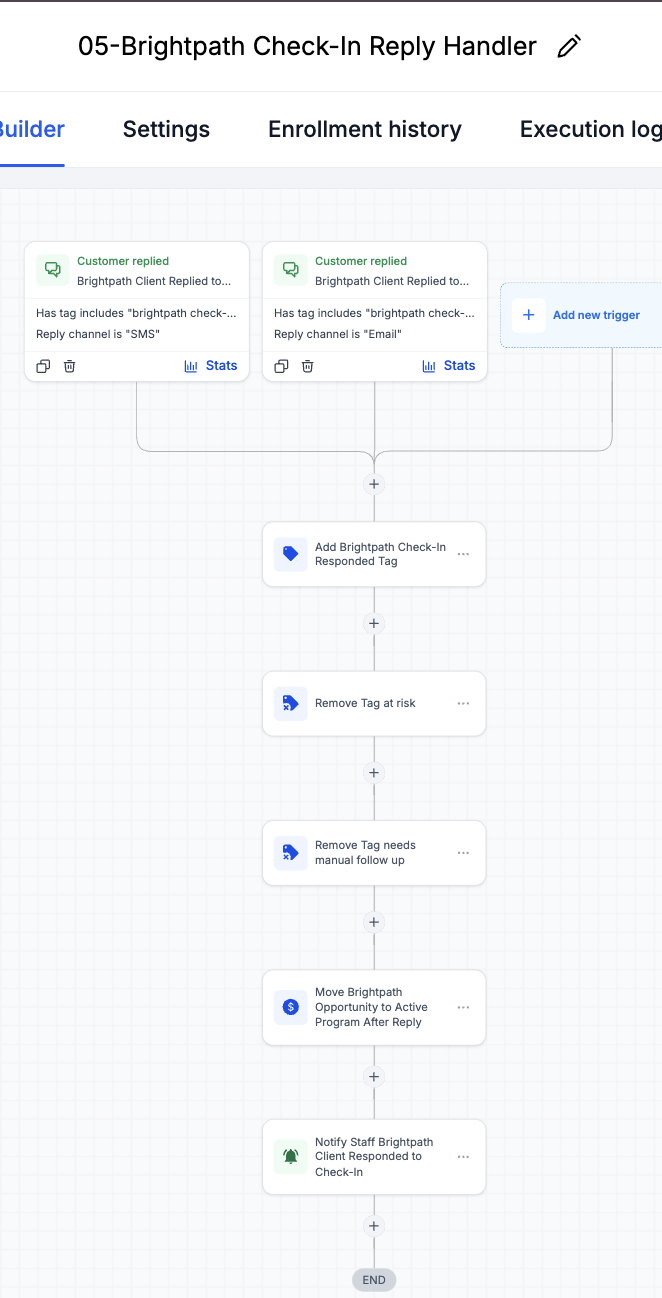
Visible implementation
Shows how client replies remove manual follow-up risk and notify staff.
04.4
Completion, review, and referral handoff
Inspect decisions and requirements
Completion/review workflow
Moves completed clients into review-requested status and sends review/referral follow-up.
What this proves
This group shows the completion path and final pipeline status for review/referral follow-up.
Primary evidenceOpen full size ↗
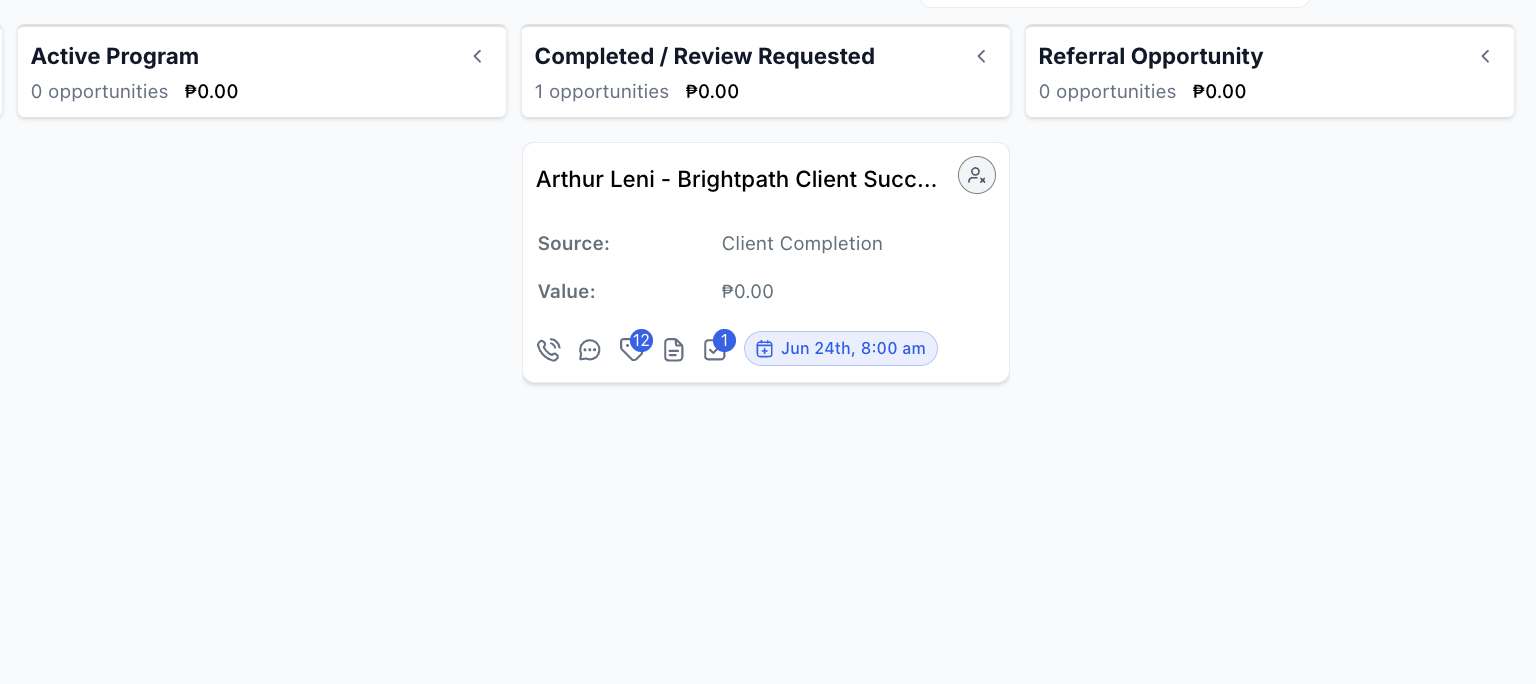
Visible implementation
Shows the sample client moved into the Completed / Review Requested pipeline stage.
Visible checks
- Sample client record
- Final pipeline stage visible
- Review request state confirmed
Supporting evidenceOpen full size ↗
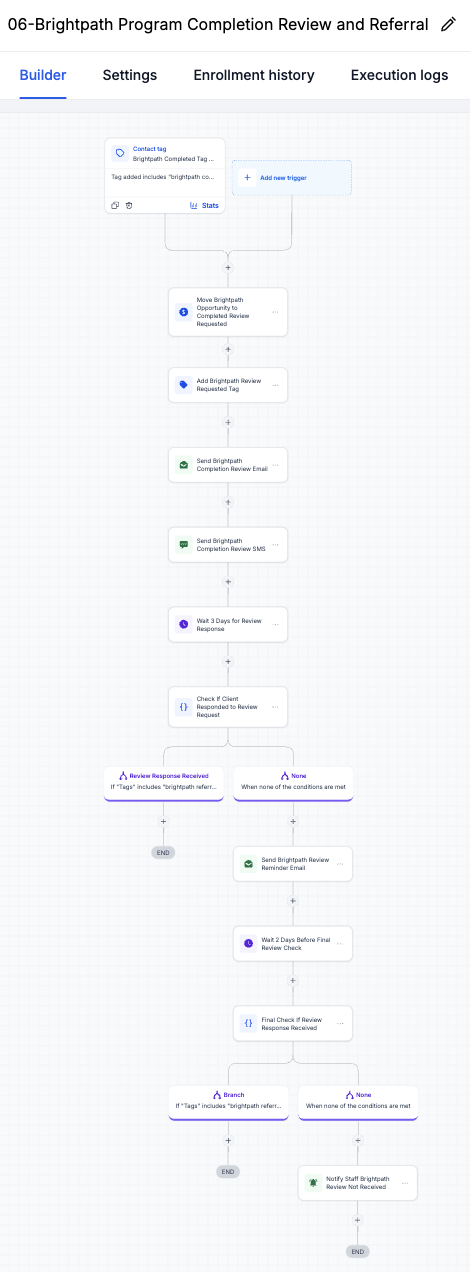
Visible implementation
Shows the completion workflow that sends review/referral follow-up and reminders.
05
QA and validation
Tested states, expected outcomes, and honest boundaries.
QA used the sample client record Arthur Leni to validate lifecycle states, handoffs, and CRM outcomes from onboarding through completion. The matrix separates tested and reviewed behavior from items that still need live validation.
QA scenario matrix
Brightpath QA checklist
01
Form submission creates or updates the sample contact
Tested with sample record02
Correct lifecycle tags are applied and removed
Tested with sample record03
Pipeline stage updates after onboarding and kickoff booking
Tested with sample record04
Staff notifications and manual handoff states are visible
Logic reviewed05
Follow-up branches trigger from onboarding, check-in, and completion states
Tested with sample record06
Duplicate and loop risk checked around reply/manual follow-up logic
Logic reviewed07
Live client message timing, reporting, and segmentation
Needs live validation08
Reporting dashboard and additional handoff QA
Next improvementThis is sample/test data used to QA the portfolio-built workflow logic.
- Record name
- Arthur Leni - sample client
- Source
- Portfolio onboarding test
- Client type
- Financial coaching client
- Current stage
- Completed / Review Requested
- Owner handoff
- Staff review task visible
- Tags
- Enrolled, onboarding complete, kickoff booked, review requested
- Follow-up status
- Retention and review path tested
- Next action
- Validate messages and reporting in live account
Expected pipeline movement
These stages show intended CRM state movement, not live client performance.
- 1New ClientCreated from enrolled tag
- 2Consult / fit checkClient context captured in onboarding
- 3Onboarding StartedForm and kickoff path active
- 4Retention CheckCheck-in and reply logic reviewed
- 5Review / Referral RequestCompletion follow-up tested
Validation artifacts
CRM proof / QA evidence
Sample client activity shows the QA path through onboarding, kickoff booking, retention, completion, and review follow-up.
Primary QA evidenceOpen full size ↗
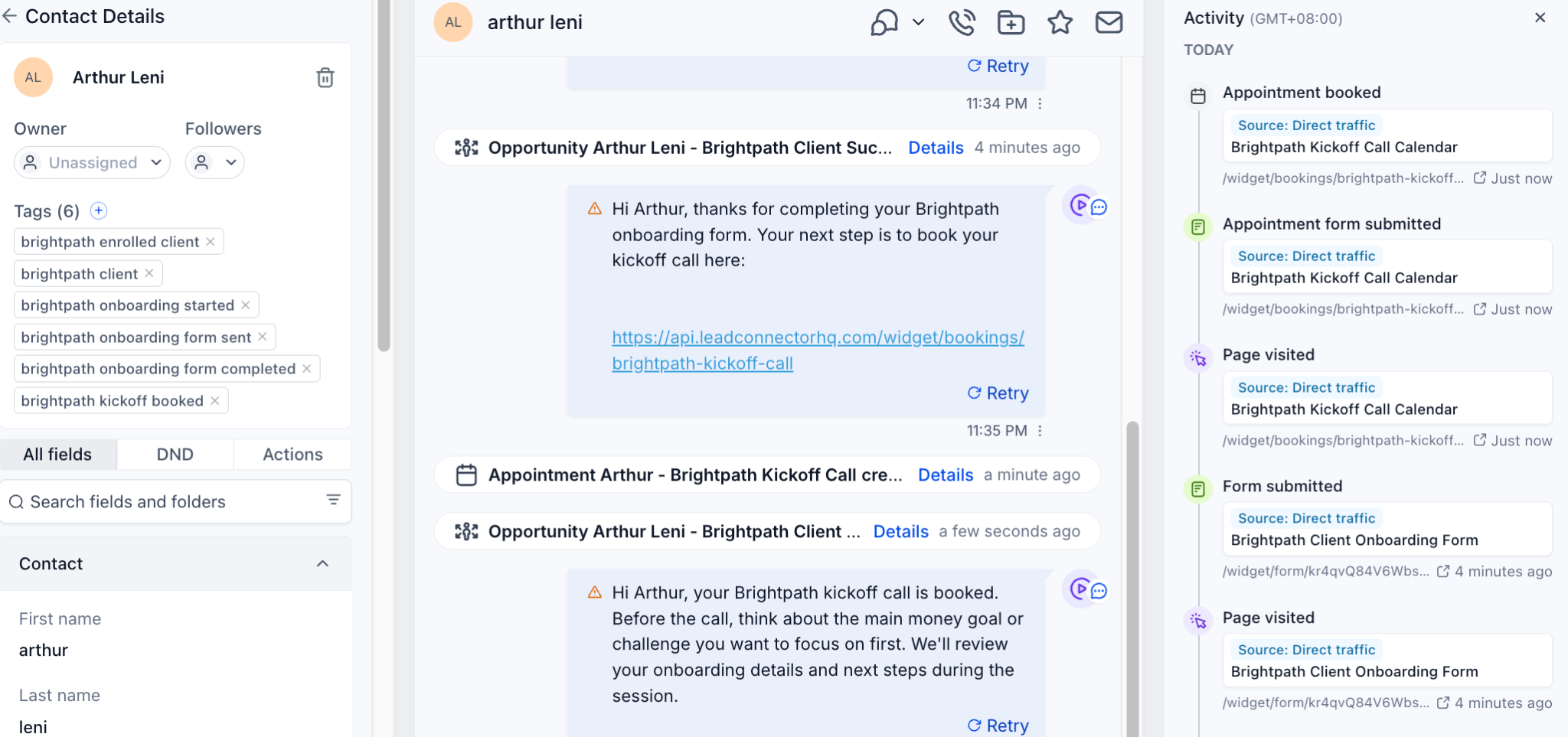
Visible implementation
Shows the sample client activity path through onboarding and kickoff booking.
Supporting QA evidenceOpen full size ↗
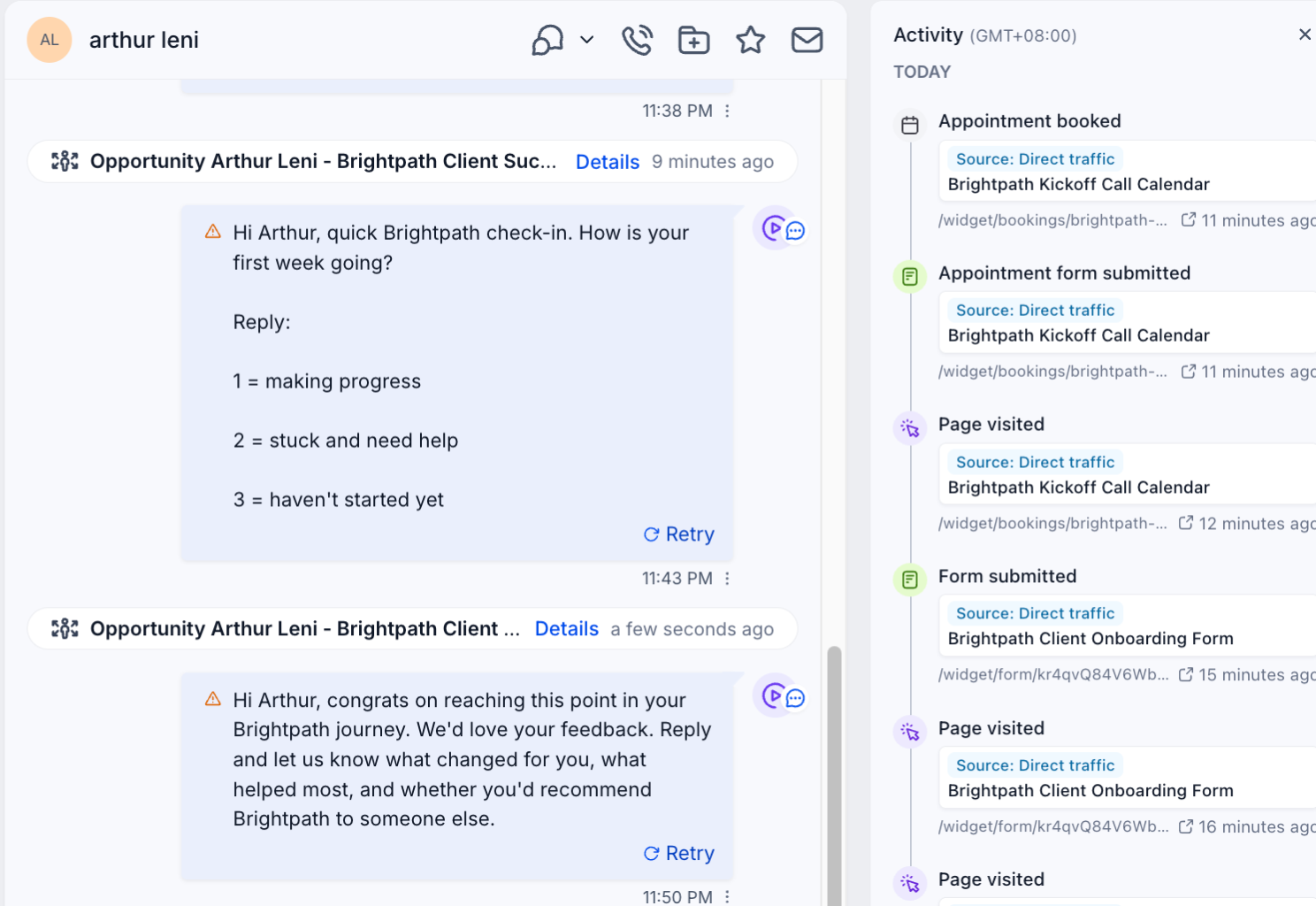
Visible implementation
Shows the sample client activity path through retention, completion, and review follow-up.
Visible checks
- QA test record
- Retention activity trail
- Completion follow-up tested
06
Outcome and reflection
Implemented scope, operating value, and next production steps.
This system is designed to make new-client onboarding more consistent, reduce post-sale drop-off, improve client progress visibility, help staff respond when engagement drops, and create a structured path for review and referral follow-up.
- Track new-client lifecycle state
- Route clients to kickoff booking
- Send active-client check-ins
- Flag manual follow-up when engagement drops
- Trigger review and referral follow-up after completion
- Project type
- Portfolio / demo automation build
- Status
- QA-tested with sample client record
This page shows build proof and QA evidence, not live client performance results. The operating-value list below describes design intent that would require live deployment data to measure.
Intended operating value
- More consistent new-client onboarding
- Faster kickoff call booking
- Cleaner client success pipeline visibility
- Fewer clients falling through the cracks
- Better staff awareness when a client needs help
- Stronger retention follow-up
- Better process for requesting reviews and referrals
- Less manual admin work for the business
What I would improve next
The core flow is intentionally simple. These additions would make the client success system stronger after live client validation.
- Validate message timing and handoff behavior inside a live client account
- Add a reporting dashboard for onboarding completion, kickoff booking, check-in response, and review/referral response
- Track message performance by lifecycle stage
- Segment follow-up by client type, service tier, or coaching path
- Add additional handoff QA for missed kickoff, no-show, and manual follow-up states