Implementation methodology

Understand the operation. Then build the system.

I use a five-stage process to reduce rework before it reaches the CRM: understand the current flow, map the decisions, build carefully, test real scenarios, and document the handoff.

Five working stages

Every stage ends with a decision and an artifact.

The method stays practical: learn what matters, define what the system must do, and only move forward when the previous stage is clear enough to test.

01

Audit

Audit the current CRM flow

Review how leads or clients enter the business, what happens next, who follows up, and where status becomes unclear.

Confirm
What is the operation trying to achieve, and where does the current path lose clarity?
Decision
Define the first bottleneck, required visibility, and the smallest useful scope.
Risk reduced
Building automation around an incomplete process or the wrong operating problem.
Ready to continue when
Goals, owners, tools, constraints, and success criteria are clear enough to map.
Stage outputA focused list of bottlenecks, missing statuses, manual handoffs, and follow-up risks.
  • Lead sources
  • Current CRM structure
  • Manual follow-up steps
  • Status visibility gaps
Representative frameworkCurrent-state audit structure
Goal
Business outcome and success criteria
Operation
Current steps, tools, data, and owners
Friction
Bottlenecks, manual work, and dependencies
Boundary
Constraints and the first useful scope

Practical meaningExample structure—not a completed client document or discovery record.

02

Map

Map the system logic before building

Define the stages, triggers, messages, branches, owner handoffs, and visibility rules before touching workflow tools.

Confirm
Which lifecycle states, decisions, data, and human handoffs must the system represent?
Decision
Choose the pipeline structure, automation boundaries, exception paths, and ownership rules.
Risk reduced
Disconnected workflows, missing states, and unclear responsibility when an exception occurs.
Ready to continue when
Every trigger, condition, expected state, and staff handoff has a place in the map.
Stage outputA practical build map covering pipeline stages, workflow triggers, follow-up branches, and staff alerts.
  • Pipeline stages
  • Trigger conditions
  • Branch logic
  • Ownership and alerts
Process templateSystem-state map
  1. 01Entry state
  2. 02Trigger
  3. 03Condition
  4. 04System action
  5. 05Staff handoff
  6. 06Expected state

Practical meaningA representative framework for deciding where automation ends and a person takes over.

QA / proof artifact

Mapped conditions that can be tested with sample records after the workflows are built.

Related proofReview the flagship system pathBrightpath connects onboarding, kickoff booking, retention checks, and review follow-up.
03

Build

Build the simplest reliable workflow set

Connect forms, calendars, CRM stages, tags, email/SMS follow-up, reminders, and notifications with clean operating logic.

Confirm
What configuration order keeps shared values, naming, and system behavior consistent?
Decision
Build the reusable CRM structure first, then connect capture, workflow, and notification components.
Risk reduced
Duplicated values, fragile workflow dependencies, and a system the team cannot maintain.
Ready to continue when
The connected components are configured and ready for scenario-based QA.
Stage outputPublished workflows, forms, calendar paths, tags, pipeline updates, and staff notification rules.
  • Forms and intake
  • Booking paths
  • Email/SMS timing
  • Internal notifications
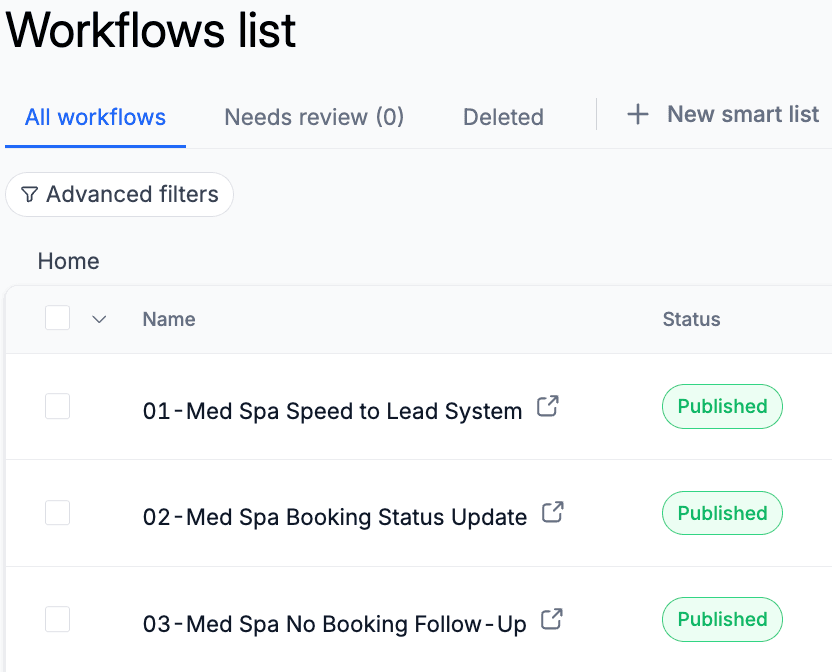
Actual portfolio evidencePublished Med Spa workflow set
Published GoHighLevel workflow list showing the Med Spa speed-to-lead, booking status, and no-booking follow-up workflows.

Practical meaningThis portfolio excerpt shows three connected automations organized as one booking system; it is not presented as paid-client delivery.

QA / proof artifact

Workflow screenshots and CRM setup evidence that show how the system is wired.

Related proofSee Med Spa booking workflowShows form capture, booking status updates, follow-up, and pipeline movement.
04

Test

Test each path with sample records

Run sample contacts through the system to catch broken triggers, missing fields, duplicate messages, and unclear pipeline movement.

Confirm
Do normal, exception, and incomplete-data paths reach the expected visible state?
Decision
Correct defects, clarify manual-review rules, and decide what is safe to hand off.
Risk reduced
Silent trigger failures, duplicate communication, incorrect timing, and misleading CRM status.
Ready to continue when
Sample scenarios show the expected messages, handoffs, activity, and pipeline outcomes.
Stage outputQA notes, sample-record outcomes, pipeline state checks, and fixes before the system is trusted.
  • Sample submissions
  • Trigger review
  • Message and notification QA
  • Pipeline movement
Actual portfolio QA evidenceScenario outcomes made visible
HVAC reactivation pipeline showing sample opportunities in no response, interested replied, and service call booked stages.
Normal path
Expected state reached
Exception path
Manual review is visible
Missing data
Unsafe action is prevented
Timing check
Messages and status occur in order

Practical meaningSample-record outcomes from a portfolio build, paired with the representative QA checks used to judge system state.

QA / proof artifact

Sample contact activity, message checks, pipeline outcomes, and next-improvement notes.

Related proofSee HVAC reactivation QAShows tested outcomes across no-response, interested/replied, and booked-service states.
05

Handoff

Handoff, document, and improve

Keep the system understandable with simple notes, visible next steps, and improvement ideas based on what the build exposes.

Confirm
What must the team understand, monitor, or improve after the initial build?
Decision
Document operating guidance, known limitations, monitoring cues, and the next improvement backlog.
Risk reduced
Knowledge loss, uncontrolled complexity, and unclear ownership after implementation.
Ready to continue when
The team can operate the system, recognize exceptions, and review future improvements deliberately.
Stage outputHandoff notes, usage guidance, cleanup items, and a restrained next-improvement plan.
  • Workflow notes
  • Handoff rules
  • Cleanup items
  • Next improvements
Process templateHandoff and improvement record
Status / ready for reviewOwner / team
  1. 01How the operating path works
  2. 02Where staff action is required
  3. 03Known limitations and monitoring cues
  4. 04Cleanup and improvement backlog

Practical meaningRepresentative structure—not documentation from a completed client engagement.

QA / proof artifact

Documented proof points and improvement notes that keep the system maintainable.

Related proofBrowse proof-led workThe case studies show screenshots, workflow logic, QA notes, and next steps together.

Collaboration requirements

The system gets clearer when responsibilities are visible.

These are the kinds of information or access typically needed at each point. Sensitive credentials should stay in the appropriate secure access process—not a website form.

  1. 01

    Audit

    Business goals, current process details, existing tools, and the people responsible for each handoff.

  2. 02

    Map

    Approved lifecycle stages, team responsibilities, communication channels, and required CRM data.

  3. 03

    Build

    Appropriate CRM access, approved messaging, calendar rules, form requirements, and notification owners.

  4. 04

    Test

    Test contacts or scenarios, timing constraints, expected message behavior, and staff confirmation of handoffs.

  5. 05

    Handoff

    Final review, operating feedback, team ownership, and agreement on what remains outside the current scope.

Method guardrails

Keep the build useful after the workflow is published.

  1. 01

    Map before building so automation has a clear operating purpose.

  2. 02

    Keep the workflow simple enough for a team to understand and maintain.

  3. 03

    Use sample records and visible CRM state to prove the system path works.

  4. 04

    Document the next improvement instead of adding complexity too early.

Start with an audit

Bring the messy workflow into the first conversation.

Send the current lead flow, CRM notes, or problem area. I’ll help identify what should be mapped, built, tested, or improved first.
