Many HVAC and aircon service businesses have old leads and past customers sitting inside their CRM with no structured follow-up. These contacts may need cleaning, repairs, maintenance, or installation quotes, but without automation, they are forgotten. The business loses repeat revenue opportunities because there is no consistent reactivation process, no clear tracking, and no reliable way to separate interested contacts from no-response contacts.
Chapter 01 · Case Study
HVAC Dormant Customer Reactivation Campaign
I built a portfolio automation system for an HVAC service business that reactivates dormant customers, sends structured email/SMS follow-up, tracks replies, updates the CRM pipeline, and routes interested contacts toward a service call.
CRM AutomationDormant Customer ReactivationHVACEmail/SMS Follow-UpPipeline TrackingBooking Automation
03Documented workflows
06Lifecycle stages
09System areas
10Proof artifacts
Scope counts describe documented implementation coverage, not business performance.
02
Problem and goal
From operational risk to visible system behavior.
The implementation starts with the operating problem, the target behavior, and the system response used to bridge the two.
The goal was to build a simple CRM automation system that reactivates dormant HVAC customers, sends follow-up messages, tracks replies, allows interested contacts to book a service call, updates the CRM pipeline, and flags no-response contacts for manual follow-up.
Starting condition
Dormant customers stayed in the CRM without a clear reactivation path, reply routing, booking status, or no-response review process.
Build decision / target behavior
The portfolio-built workflow segments dormant contacts, sends structured follow-up, routes replies, updates pipeline state, and flags no-response contacts for manual review.
03
System architecture
A reactivation system that separates interested, booked, and no-response contacts.
The build connects dormant customer tags, campaign follow-up, reply handling, booking status updates, and staff notifications so old contacts do not stay invisible inside the CRM.
Signature system map
Reactivation workflow map
A compact view of the HVAC campaign logic from dormant segment to booked or no-response outcome.
- 01
Dormant segment
Dormant customer tag starts the campaign.
- 02
Reactivation outreach
Email/SMS follow-up asks for service interest.
- 03
Reply handling
Replies move the contact to Interested / Replied.
- 04
Booking request
Interested contacts can request and book service.
- 05
No response
No-response contacts are flagged for manual follow-up.
Journey ↔ CRM state
One progression, two operational views.
A dormant customer enters the campaign when tagged in the CRM. The system creates a reactivation opportunity, sends follow-up, waits, checks for engagement, and routes the contact based on behavior. No-response contacts are flagged for manual review, interested contacts are moved to the reply stage, and booked contacts move to the service call booked stage.
Customer progression
What the customer experiences, including exception handoffs.
- 01Dormant Customer
- 02Reactivation Sent
- 03Interested / Replied
- 04Service Call Booked
- 05No Response
- 06Manual Follow-Up
CRM state
The record states staff use to see and manage that progression.
HVAC Reactivation Pipeline
- 01Dormant Customer
- 02Reactivation Sent
- 03No Response
- 04Interested / Replied
- 05Service Call Booked
System inventory
Connected parts, not equal-weight feature cards.
- 01
HVAC Reactivation Pipeline
Creates a clear path from dormant customer to reactivation sent, interested/replied, no response, or service call booked.
- 02
Dormant customer tags
Segments old contacts and starts the campaign from a clear CRM trigger instead of manual list handling.
- 03
Reactivation campaign workflow
Sends structured email/SMS follow-up and waits before deciding whether a contact needs another touch or manual review.
- 04
Reply handler workflow
Routes SMS and email replies into the interested stage so staff can respond while intent is visible.
- 05
Booking status workflow
Keeps tags and pipeline stages aligned when a customer books a service call.
- 06
Service call booking form
Captures service details, urgency, address, and consent before the customer schedules.
- 07
Service call calendar
Gives interested contacts a direct path from reactivation message to booked service call.
- 08
Staff notifications
Alerts staff when a contact replies, books, or needs manual follow-up after no response.
- 09
Contact activity tracking
Shows the campaign messages, pipeline movement, booking activity, and QA evidence inside sample contact records.
Architecture artifact
System overview
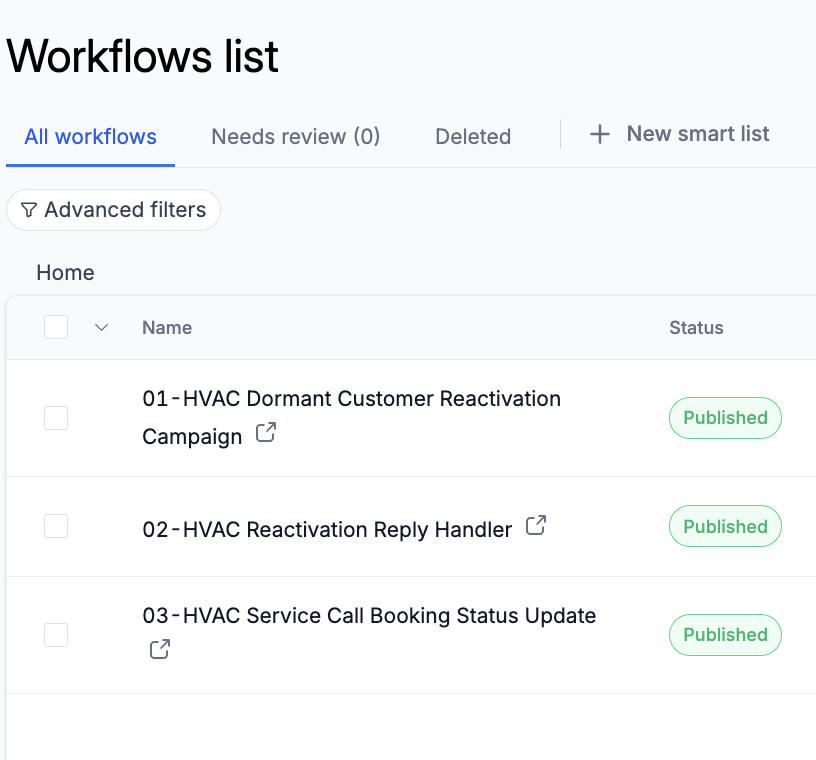
The workflow list shows the three connected automations used for reactivation, reply handling, and booking status updates.
System overview proofOpen full size ↗
Visible implementation
Shows the published workflow set used for dormant customer reactivation, reply handling, and booking status updates.
Visible checks
- Portfolio-built workflow set
- Campaign, reply, and booking logic separated
- QA-ready automation structure
04
Key implementation evidence
Decisions paired directly with readable proof.
The workflow cards explain the reactivation logic; the screenshots trace campaign setup, booking paths, pipeline outcomes, and sample-contact QA.
Workflow overview
3 workflows keep the system moving.
The workflows split the reactivation journey into campaign follow-up, reply handling, and booked-service-call status updates.
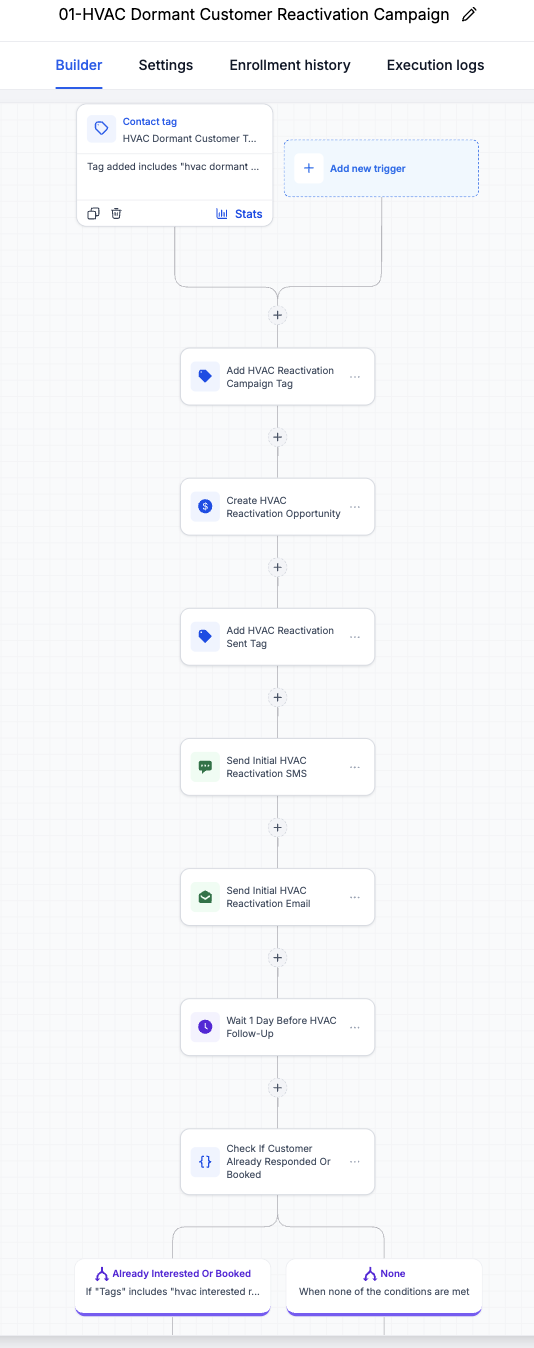
01PurposeWorkflow 01: Dormant Customer Reactivation CampaignTriggerDormant customer tag added
Full documented action path
- Create reactivation opportunity
- Add campaign tracking tags
- Move opportunity to Reactivation Sent
- Send initial reactivation email/SMS
- Wait before follow-up
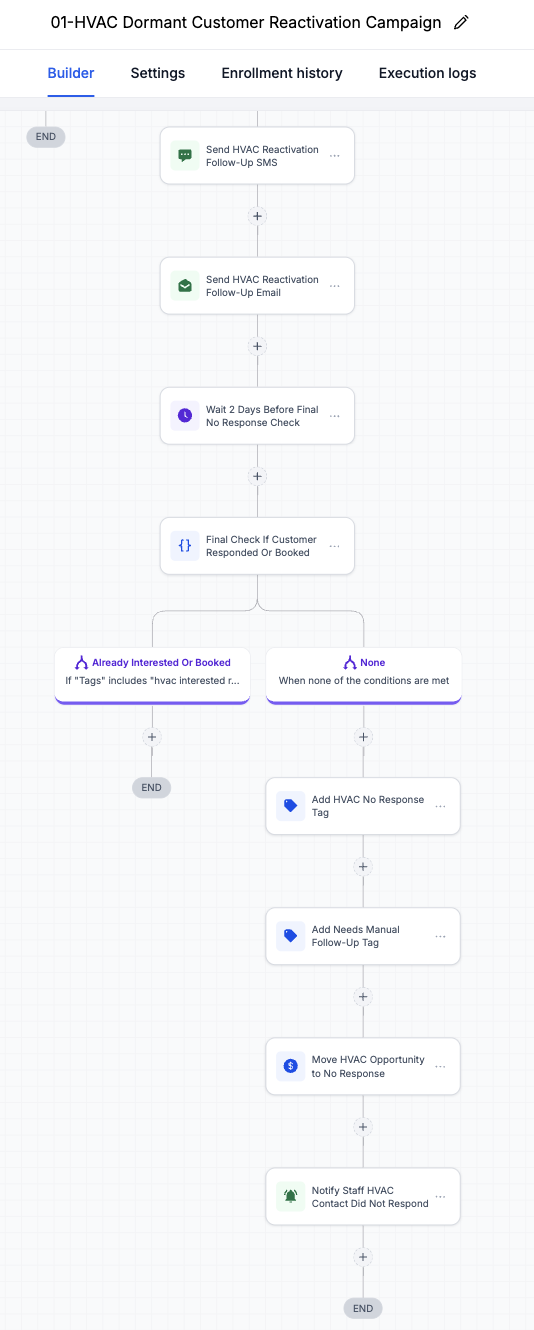
- Send follow-up message if needed
- If still no response, add no-response/manual follow-up tags
- Move opportunity to No Response
- Notify staff for manual follow-up
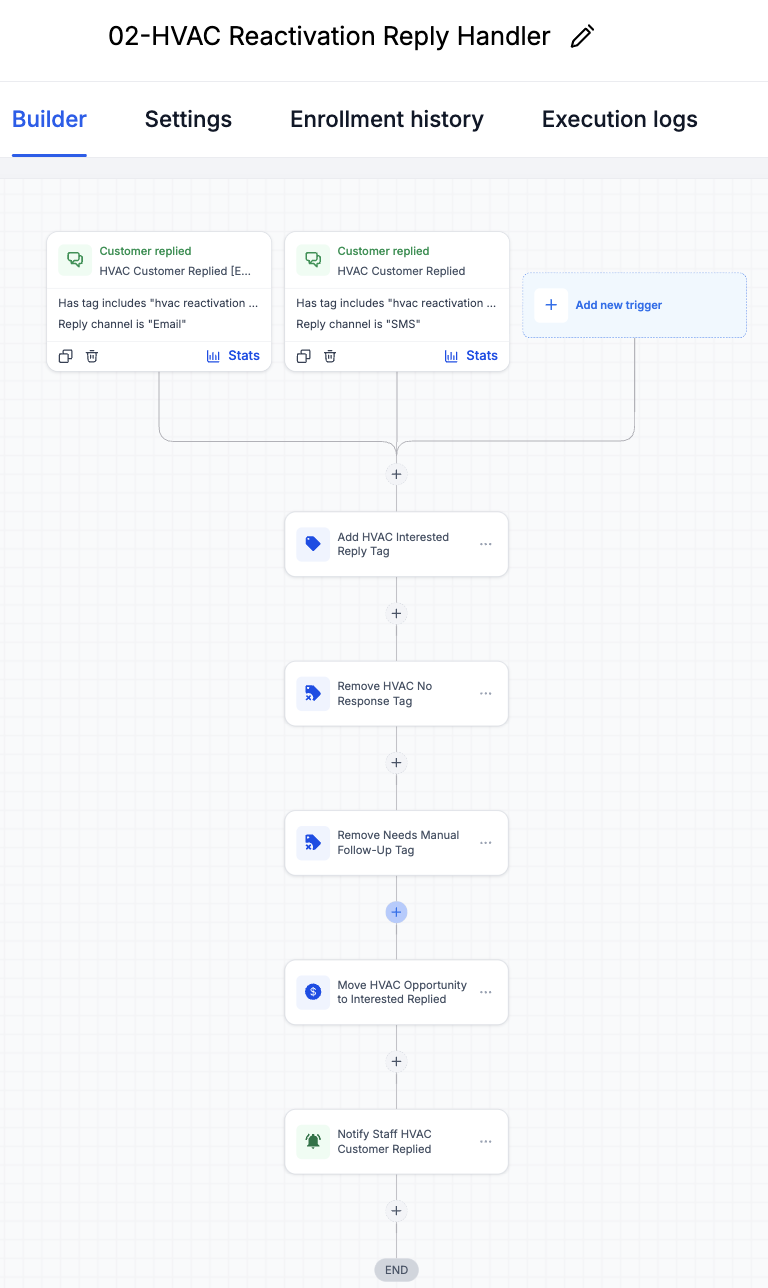
02PurposeWorkflow 02: Reactivation Reply HandlerTriggerCustomer replies by SMS or email
Full documented action path
- Add interested/replied tag
- Move opportunity to Interested / Replied
- Notify staff to follow up
- Keep the contact visible for service call conversion
03PurposeWorkflow 03: Service Call Booking Status UpdateTriggerCustomer books a service call
Full documented action path
- Add service call booked tag
- Move opportunity to Service Call Booked
- Notify staff of the booked service call
- Keep CRM status aligned with booking activity
04.1
Reactivation campaign and no-response routing
Inspect decisions and requirements
Reactivation campaign workflow
Sends structured email/SMS follow-up and waits before deciding whether a contact needs another touch or manual review.
What this proves
The campaign workflow handles dormant customer entry, initial follow-up, response checks, and no-response routing.
Primary evidenceOpen full size ↗
Visible implementation
Shows the campaign setup that starts when a dormant customer tag is added.
Supporting evidenceOpen full size ↗
Visible implementation
Shows the follow-up and no-response handling used to keep dormant contacts from being forgotten.
Visible checks
- No-response branch
- Manual follow-up flag
- Pipeline movement reviewed
04.2
Reply and booked-state handoffs
Inspect decisions and requirements
Reply handler workflow
Routes SMS and email replies into the interested stage so staff can respond while intent is visible.
Booking status workflow
Keeps tags and pipeline stages aligned when a customer books a service call.
What this proves
These workflows keep CRM stages, tags, and staff notifications aligned when customers reply or book.
Primary evidenceOpen full size ↗
Visible implementation
Shows how customer replies are routed into the Interested / Replied stage.
Supporting evidenceOpen full size ↗
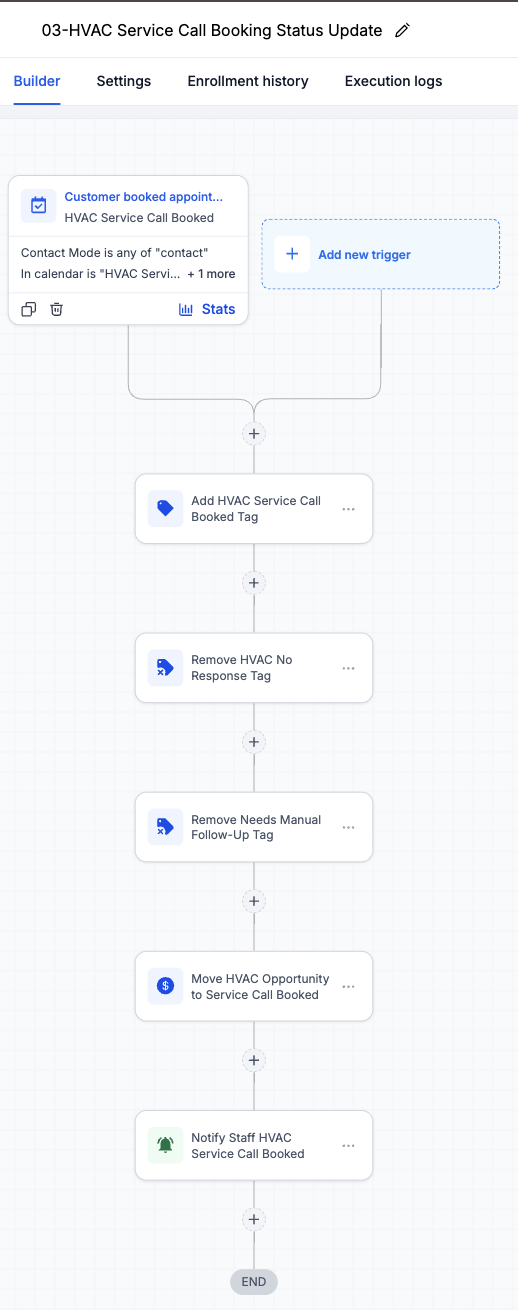
Visible implementation
Shows how booked service calls update tags, pipeline status, and staff visibility.
04.3
Service request to calendar booking
Inspect decisions and requirements
Service call booking form
Captures service details, urgency, address, and consent before the customer schedules.
Service call calendar
Gives interested contacts a direct path from reactivation message to booked service call.
What this proves
Interested customers can move from reactivation response into a service call request and calendar booking.
Primary evidenceOpen full size ↗
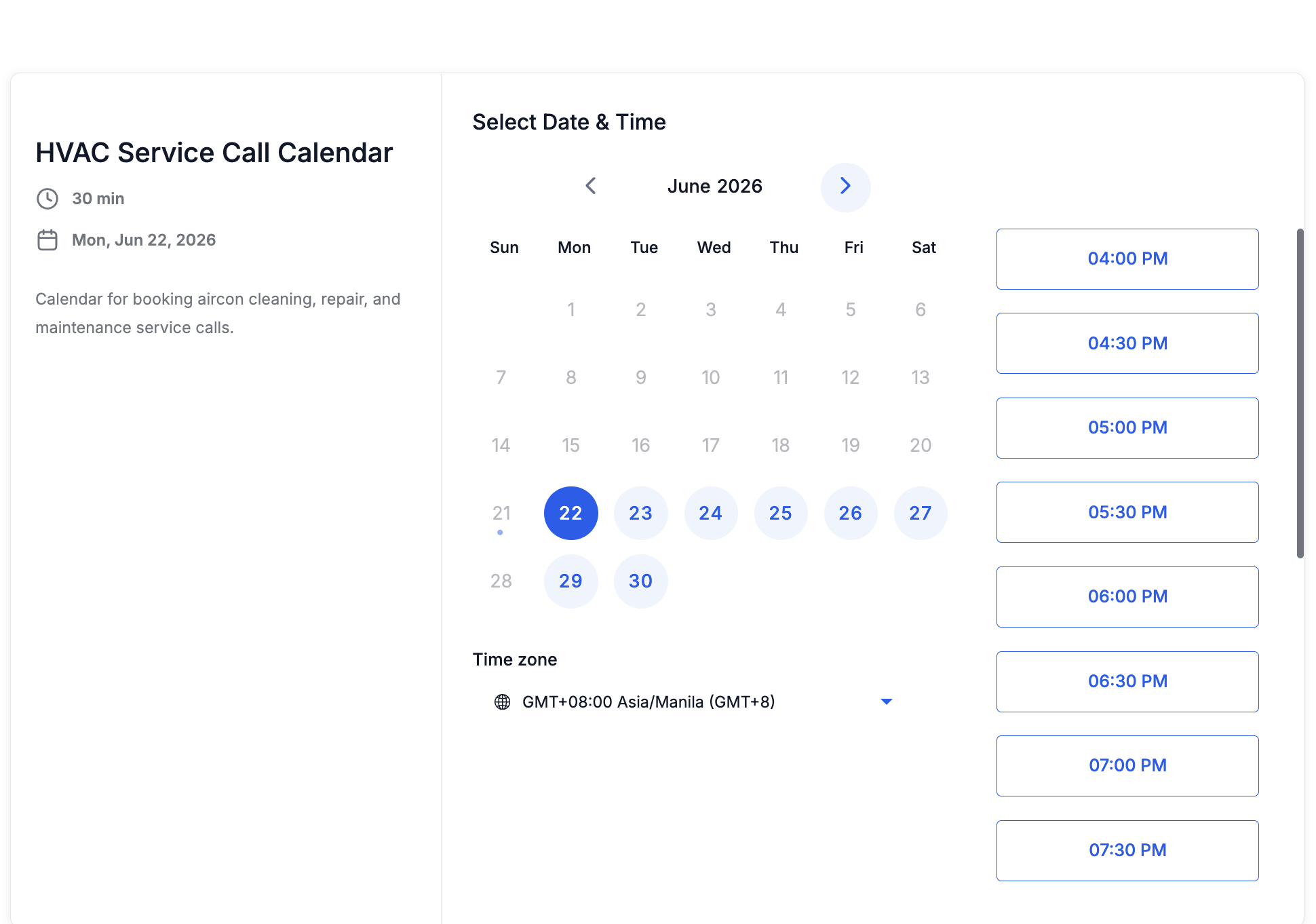
Visible implementation
Shows the calendar step where an interested customer can schedule a service call.
Supporting evidenceOpen full size ↗
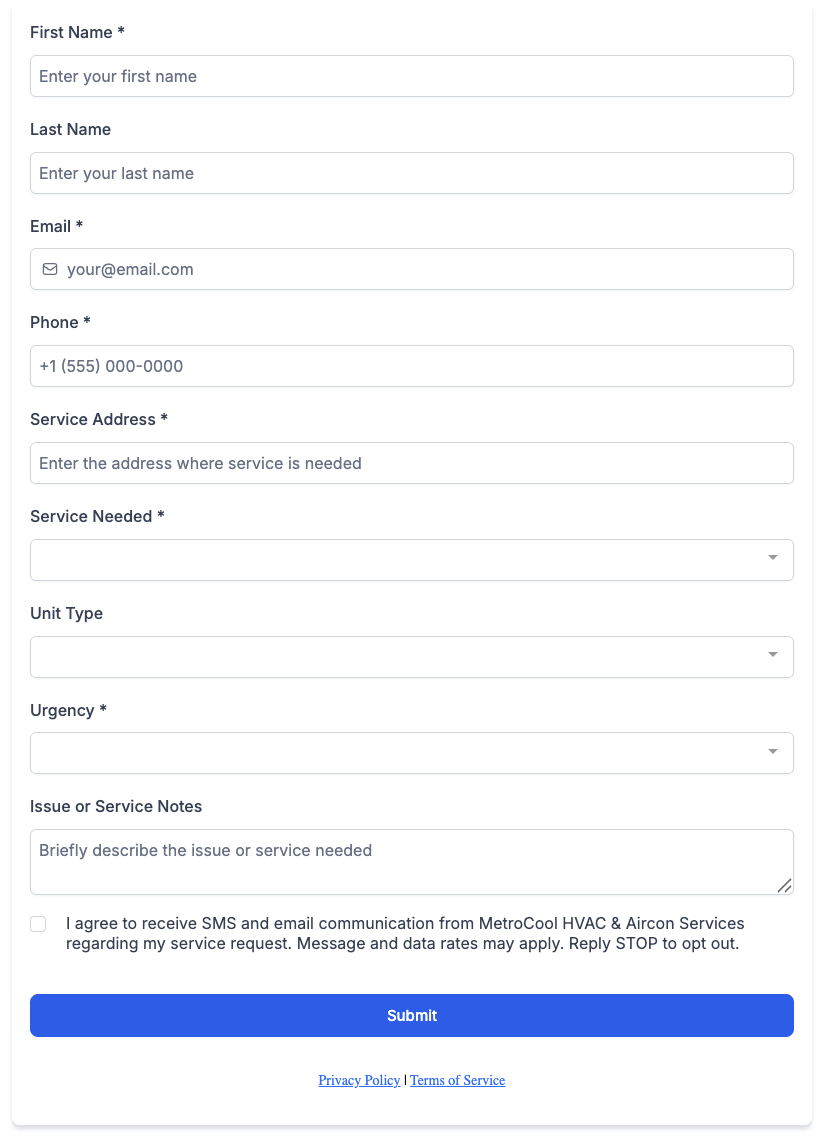
Visible implementation
Shows the service call booking form used to capture request details.
05
QA and validation
Tested states, expected outcomes, and honest boundaries.
QA used sample contacts to validate reactivation routing, booking movement, pipeline outcomes, and manual-review states. The matrix separates tested behavior from live compliance validation and planned seasonal and reporting improvements.
QA scenario matrix
HVAC QA checklist
01
Dormant segment logic starts the workflow from the correct tag
Tested with sample record02
Reactivation trigger sends the expected campaign steps
Logic reviewed03
Reply/interest branch moves contacts into interested state
Tested with sample record04
Pipeline stage updates for interested, no-response, and booked outcomes
Tested with sample record05
Suppression and opt-out awareness noted before live SMS use
Needs live validation06
Seasonal variants, better segmentation, and conversion reporting
Next improvementThese are sample/test contacts used to verify reactivation logic and pipeline movement.
- Record names
- Daniel Santos / Sophia Cruz - sample contacts
- Customer segment
- Dormant HVAC customer
- Last service date
- Sample historical service date
- Reactivation status
- Sent, replied, or booked outcome tested
- Reply status
- Interested reply branch reviewed
- Booking stage
- Service Call Booked sample outcome
- Suppression awareness
- Opt-out/compliance review needed before live SMS
Expected pipeline movement
These stages describe system state, not revenue or campaign performance.
- 1Dormant CustomerSegment enters campaign
- 2Reactivation SentInitial email/SMS path triggered
- 3Interested / RepliedReply branch routes staff follow-up
- 4Estimate / Service BookedBooking status workflow updates CRM
- 5Follow-up or No ResponseManual review or suppression check
Validation artifacts
CRM proof / QA evidence
Sample pipeline and contact activity records show how test contacts moved through the reactivation outcomes.
Primary QA evidenceOpen full size ↗

Visible implementation
Shows sample reactivation outcomes across the HVAC Reactivation Pipeline.
Visible checks
- Sample opportunities
- Interested/replied state
- Booked service call state
- No-response outcome visible
Supporting QA evidenceOpen full size ↗
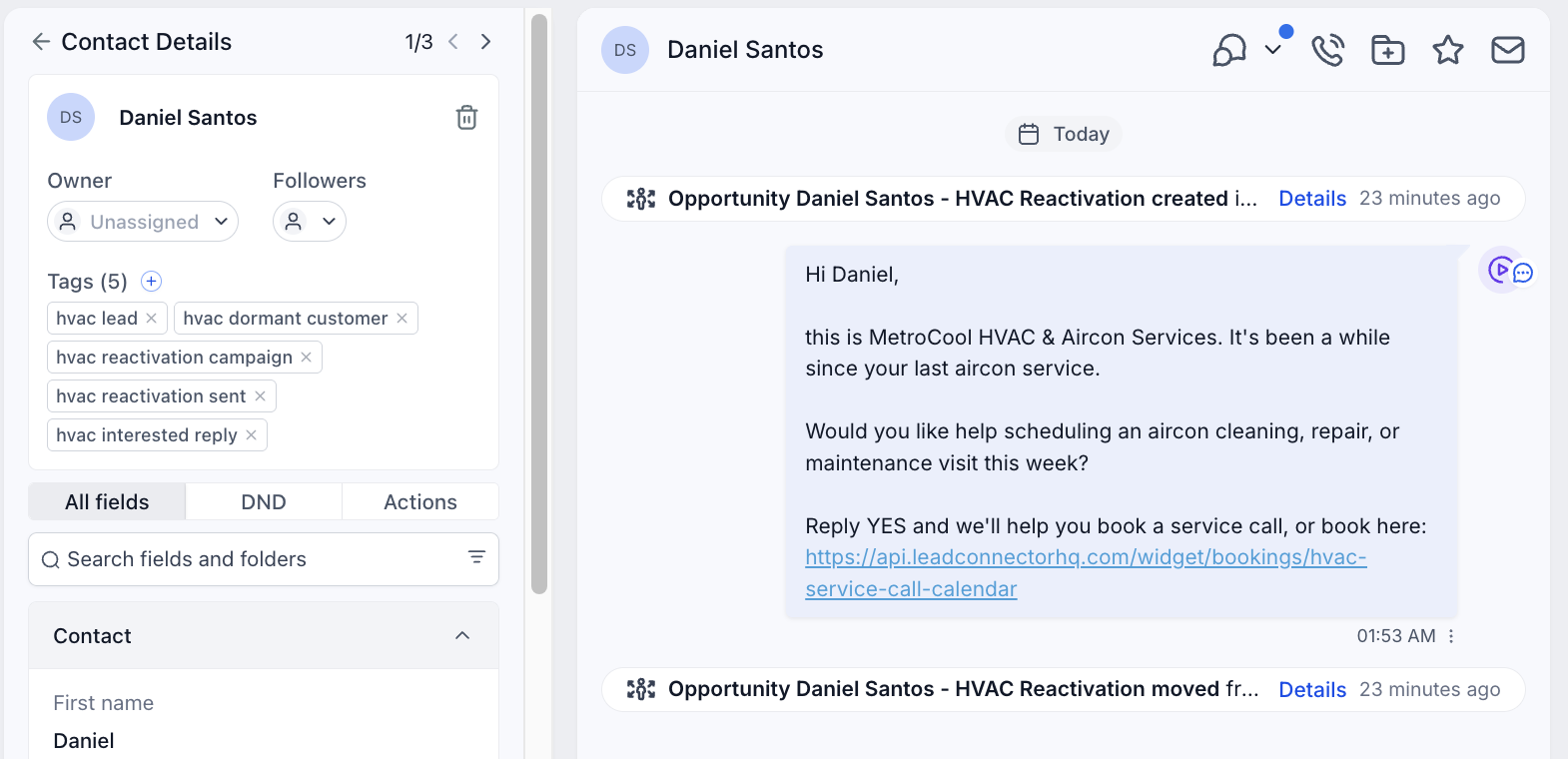
Visible implementation
Shows a sample contact activity path for an interested/replied customer.
Supporting QA evidenceOpen full size ↗
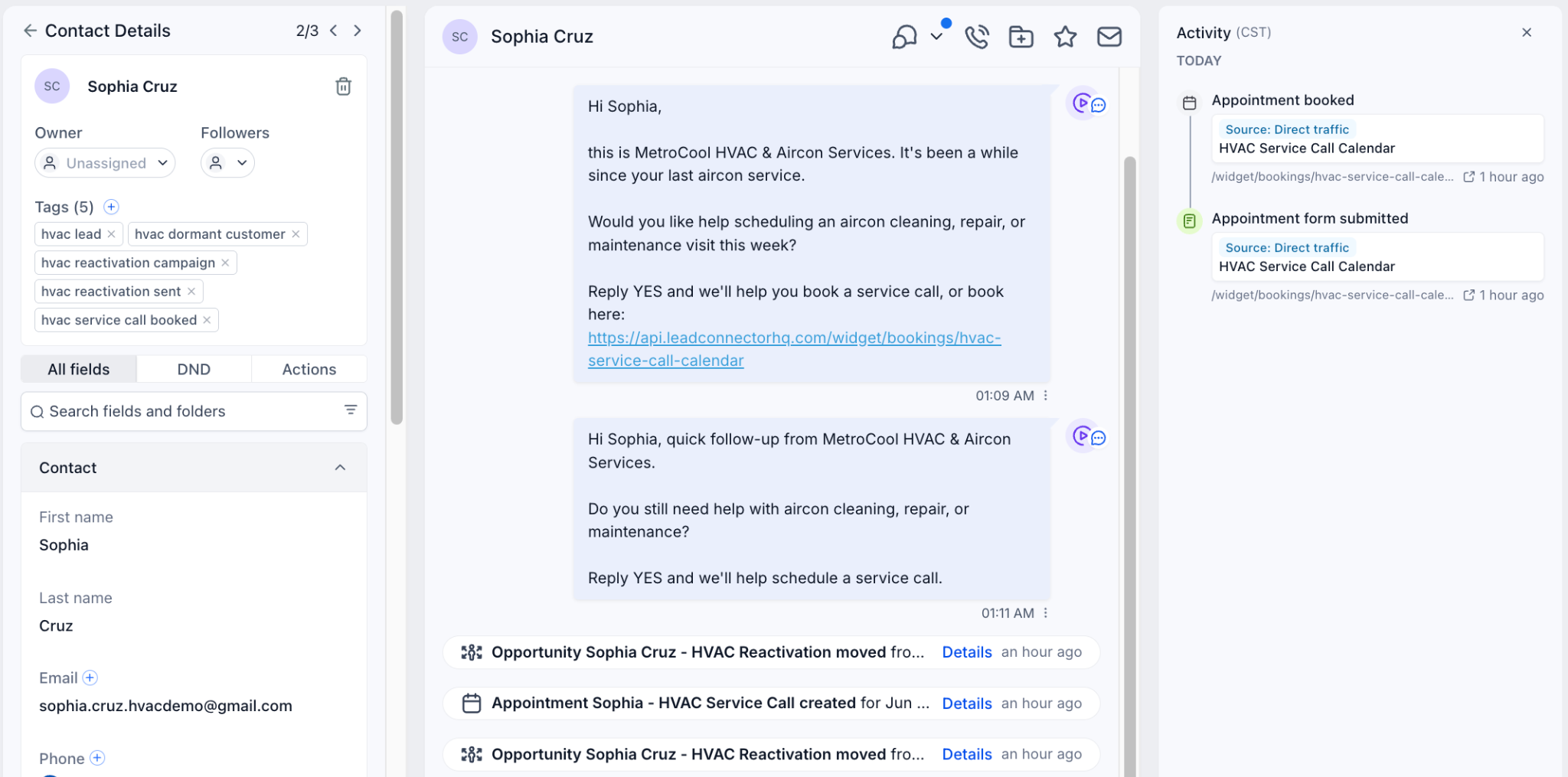
Visible implementation
Shows a sample contact activity path for a booked service call.
Visible checks
- QA test record
- Booking activity visible
- Service call booked tag
06
Outcome and reflection
Implemented scope, operating value, and next production steps.
This system is designed to make dormant customer follow-up more consistent, improve visibility into reactivation outcomes, help staff respond faster to interested contacts, and reduce manual tracking.
- Reactivate dormant customers
- Send structured email/SMS follow-up
- Track replies and service call bookings
- Update HVAC pipeline stages
- Flag no-response contacts for manual follow-up
- Project type
- Portfolio / demo automation build
- Status
- QA-tested with sample contacts
This page shows build proof and QA evidence, not live client performance results. The operating-value list below describes design intent that would require live deployment data to measure.
Intended operating value
- More consistent dormant customer follow-up
- Better chance of recovering repeat service opportunities
- Cleaner CRM pipeline visibility
- Faster staff response to interested contacts
- Reduced manual tracking
- Clearer separation between interested, booked, and no-response contacts
What I would improve next
The core flow is intentionally simple. These additions would make the reactivation system stronger before and after live HVAC use.
- Add seasonal campaign variants for maintenance, repair, and installation offers
- Improve segmentation by last service type, unit age, and customer history
- Track reply quality and staff response timing
- Add booking conversion reporting for reactivation, reply, and service-call stages
- Run compliance review before live SMS use, including opt-out and suppression handling