Med spas can lose potential bookings when website leads submit interest but do not receive fast follow-up, do not book a consultation, or are not tracked clearly inside the CRM. A form submission alone does not guarantee a booked consultation. The business needs a connected system that captures the lead, guides them to the next step, alerts staff, updates the pipeline, and follows up when booking does not happen.
Chapter 01 · Case Study
Med Spa Consultation Booking & Follow-Up Automation
I built a portfolio automation system for a med spa consultation funnel that captures new leads, routes them to a booking calendar, updates the CRM, notifies staff, and follows up when a lead does not book.
Lead CaptureSpeed-to-LeadBooking AutomationCRM PipelineFollow-Up
03Documented workflows
05Lifecycle stages
06System areas
13Proof artifacts
Scope counts describe documented implementation coverage, not business performance.
02
Problem and goal
From operational risk to visible system behavior.
The implementation starts with the operating problem, the target behavior, and the system response used to bridge the two.
The goal was to design a simple consultation flow that connects inquiry, follow-up, booking, and CRM tracking. The system needed to reduce manual lead handling, make status visible, and give non-booked leads another chance to convert.
Starting condition
A consultation request could stay disconnected from fast follow-up, booking status, staff visibility, and no-booking recovery.
Build decision / target behavior
The portfolio-built workflow captures the inquiry, routes the lead to booking, updates CRM state, notifies staff, and follows up when booking does not happen.
03
System architecture
A connected funnel from inquiry to booked consultation.
Each part is simple on its own, but the value comes from making the handoff between form, calendar, workflow, and CRM visible.
Signature system map
Booking workflow map
A compact view of the consultation path from inquiry capture through booking or next follow-up.
- 01
Inquiry capture
Consultation form collects service interest and consent.
- 02
Booking path
Lead is routed toward the consultation calendar.
- 03
Missed lead follow-up
No-booking branch checks whether follow-up should continue.
- 04
Staff notification
New and booked lead states are visible to staff.
- 05
Next follow-up
Unbooked leads remain trackable for manual review.
Operational journey
The documented lifecycle before the detailed workflow index.
- 01Form submitted
- 02Calendar booking
- 03CRM update
- 04Staff notified
- 05Follow-up branch
System inventory
Connected parts, not equal-weight feature cards.
- 01
Consultation request form
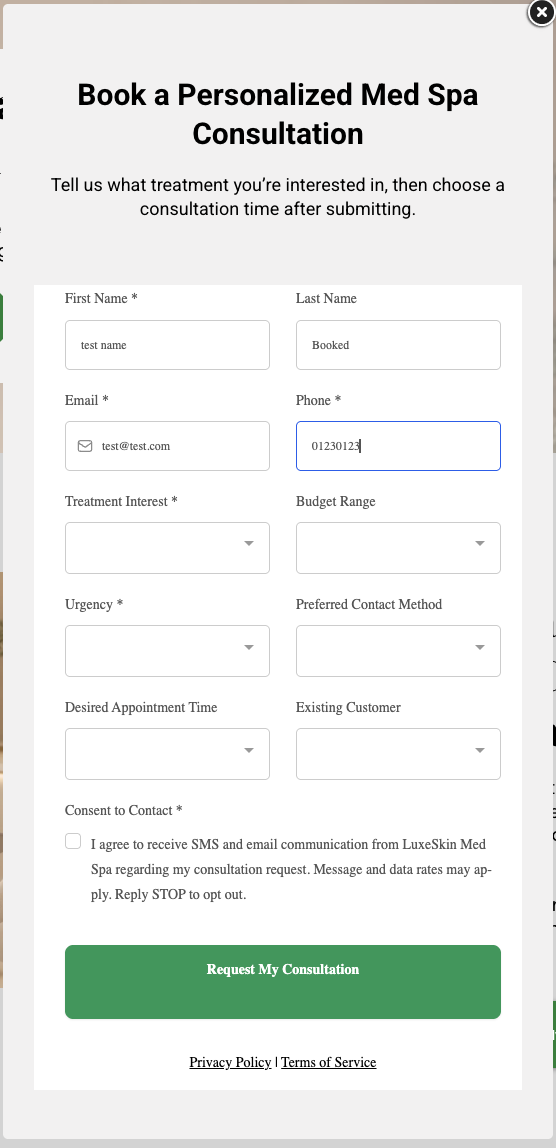
Captures treatment interest, contact details, urgency, and consent so the CRM has enough context for follow-up.
- 02
Calendar redirect
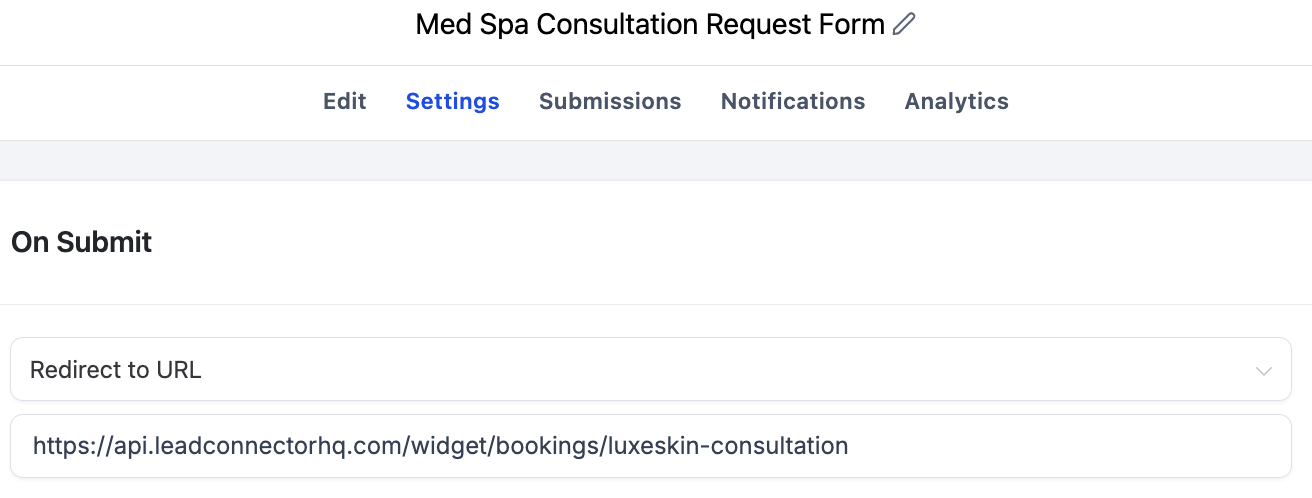
Moves the lead from inquiry to scheduling by sending form submissions straight to the consultation calendar.
- 03
Speed-to-lead follow-up
Sends immediate email/SMS follow-up and alerts staff while the lead is still warm.
- 04
Booking status update
Detects booked consultations, updates tags, moves the opportunity, and notifies staff.
- 05
No-booking recovery
Follows up with leads who submitted interest but did not schedule, then flags remaining leads for manual review.
- 06
CRM pipeline tracking
Keeps consultation status visible so staff can see where each lead sits in the funnel.
Architecture artifact
System overview
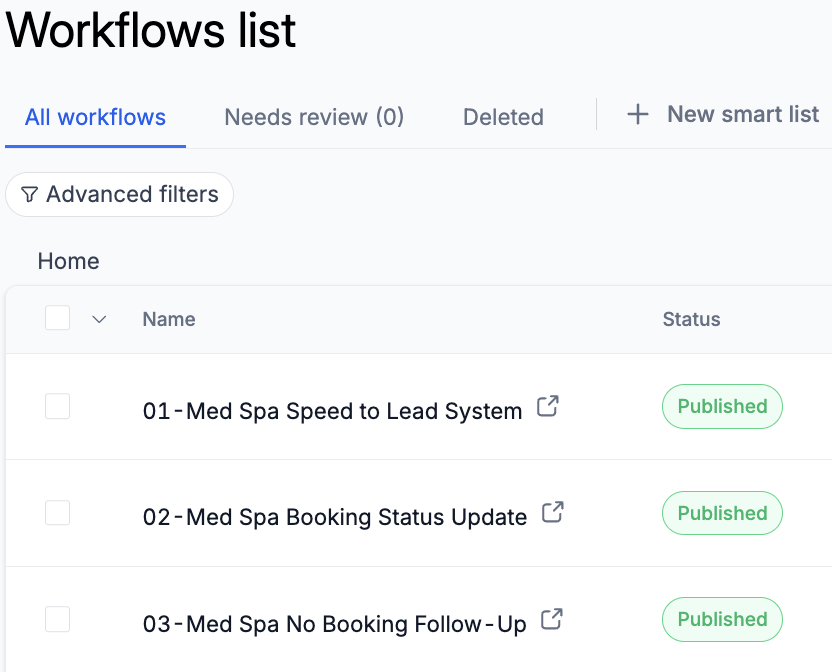
The workflow list shows the three connected automations used for speed-to-lead, booking status updates, and no-booking recovery.
System overview proofOpen full size ↗
Visible implementation
Proves the demo system is organized around three published automations.
Visible checks
- Portfolio-built workflow set
- Speed-to-lead path
- No-booking recovery included
04
Key implementation evidence
Decisions paired directly with readable proof.
The workflow cards explain the system logic; the screenshots trace setup, lead movement, booking state, and QA evidence.
Workflow overview
3 workflows keep the system moving.
The automation is organized around the business moments that matter: new lead, booked appointment, and no-booking recovery.
01PurposeWorkflow 01: Speed-to-Lead SystemTriggerMed spa consultation form submitted
Full documented action path
- Add lead classification tags
- Set lead source to website form
- Assign lead to staff
- Create a new consultation opportunity
- Notify staff of a new consultation lead
- Send instant consultation email
- Send instant consultation SMS
- Check urgency
- If urgency is high, tag as hot lead and notify staff
02PurposeWorkflow 02: Booking Status UpdateTriggerConsultation appointment booked
Full documented action path
- Remove no-booking tag
- Add booked consultation tag
- Move opportunity to Booked Consultation
- Notify staff of booked consultation
03PurposeWorkflow 03: No-Booking Follow-UpTriggerLead has no-booking tag
Full documented action path
- Wait before follow-up
- Check if the lead still has the no-booking tag
- Send no-booking follow-up email
- Send no-booking follow-up SMS
- Wait again before final follow-up
- Check booking status again
- Send final follow-up
- Add needs manual follow-up tag
- Notify staff if lead still has not booked
04.1
Lead capture to calendar booking
Inspect decisions and requirements
Consultation request form
Captures treatment interest, contact details, urgency, and consent so the CRM has enough context for follow-up.
Calendar redirect
Moves the lead from inquiry to scheduling by sending form submissions straight to the consultation calendar.
What this proves
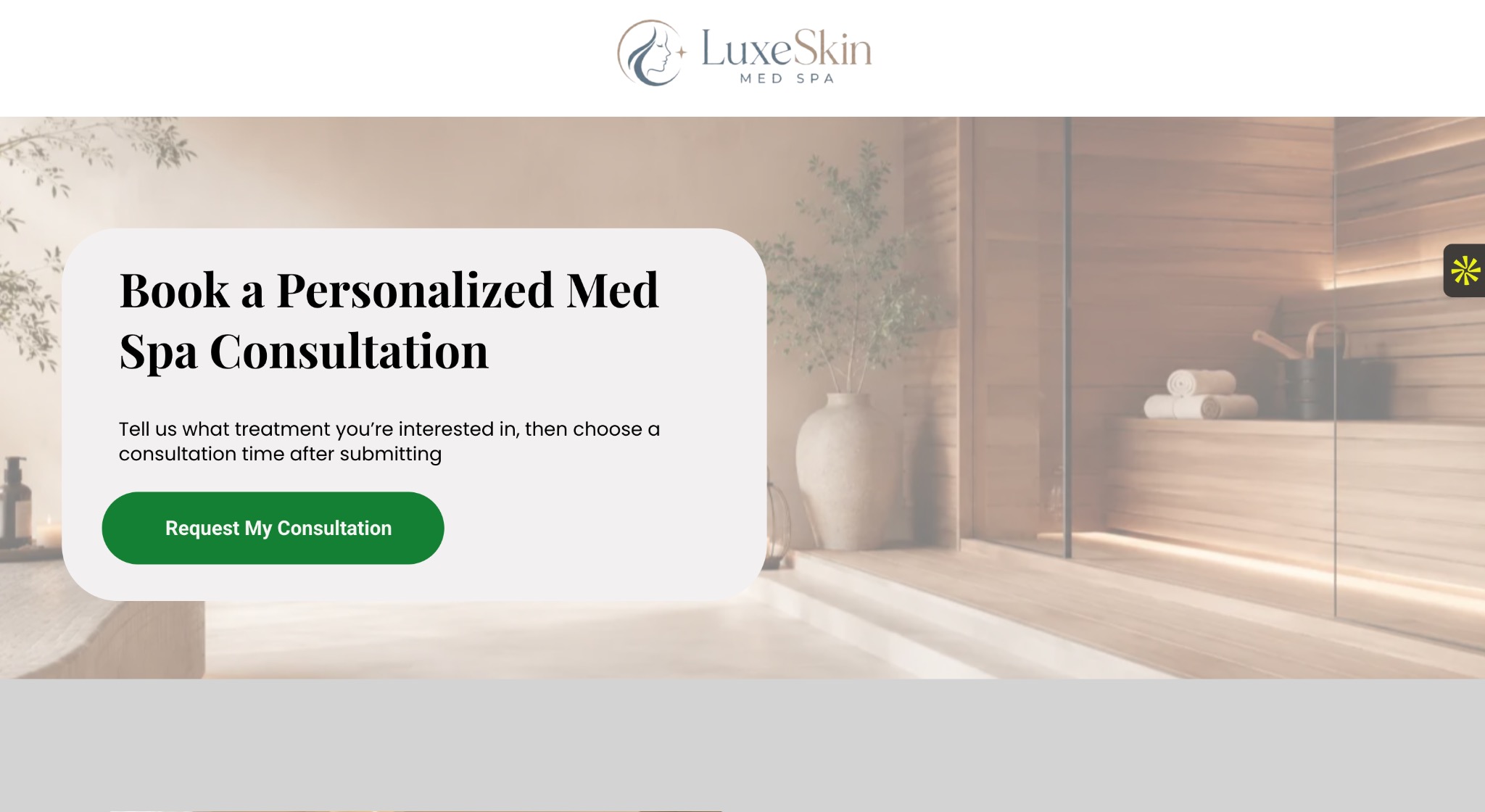
The lead starts on a consultation page, submits a form, and is redirected to the booking calendar.
Primary evidenceOpen full size ↗
Visible implementation
Shows the front-end consultation CTA where the lead capture path begins.
Supporting evidenceOpen full size ↗
Visible implementation
Shows the form fields used to capture lead context before follow-up.
Visible checks
- Lead source captured
- Treatment interest collected
- Consent field present
Supporting evidenceOpen full size ↗
Visible implementation
Proves the form submission routes the lead directly to the booking calendar.
Supporting evidenceOpen full size ↗
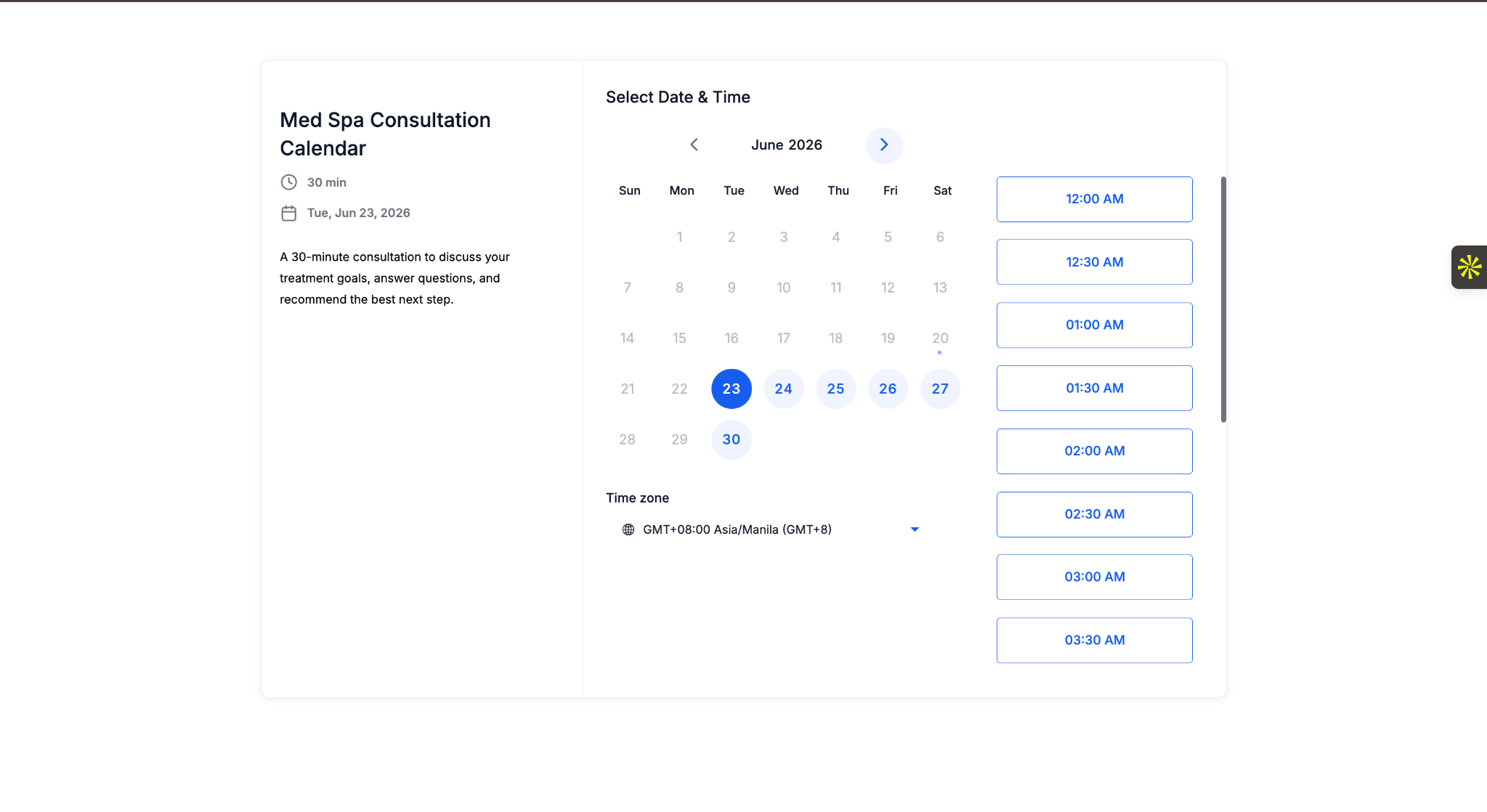
Visible implementation
Shows the booking step where the consultation can be scheduled.
04.2
Immediate response and booked-state updates
Inspect decisions and requirements
Speed-to-lead follow-up
Sends immediate email/SMS follow-up and alerts staff while the lead is still warm.
Booking status update
Detects booked consultations, updates tags, moves the opportunity, and notifies staff.
What this proves
The workflows handle immediate follow-up, urgency tagging, booking status updates, and no-booking recovery.
Primary evidenceOpen full size ↗
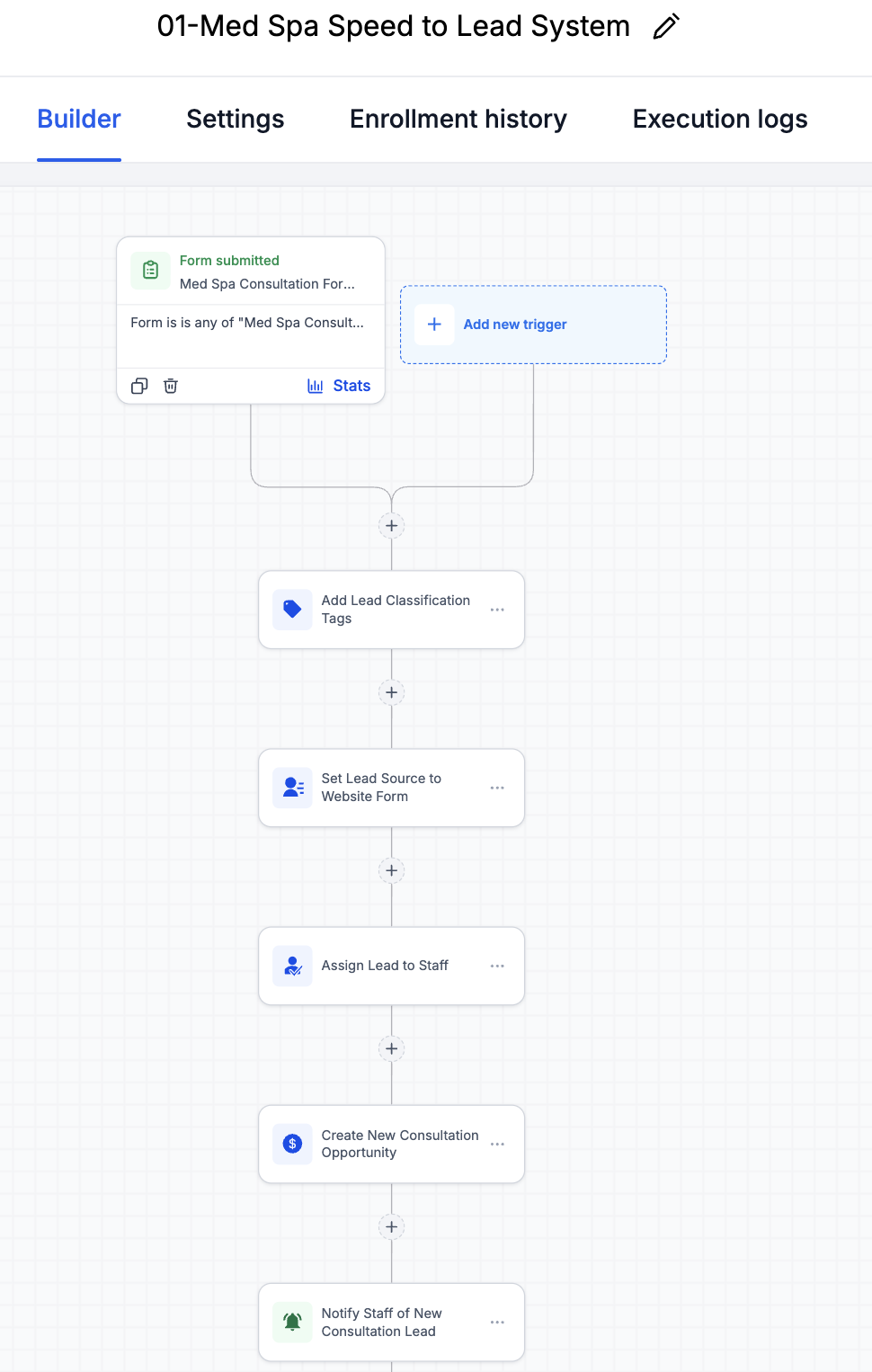
Visible implementation
Proves the workflow creates CRM structure immediately after form submission.
Supporting evidenceOpen full size ↗
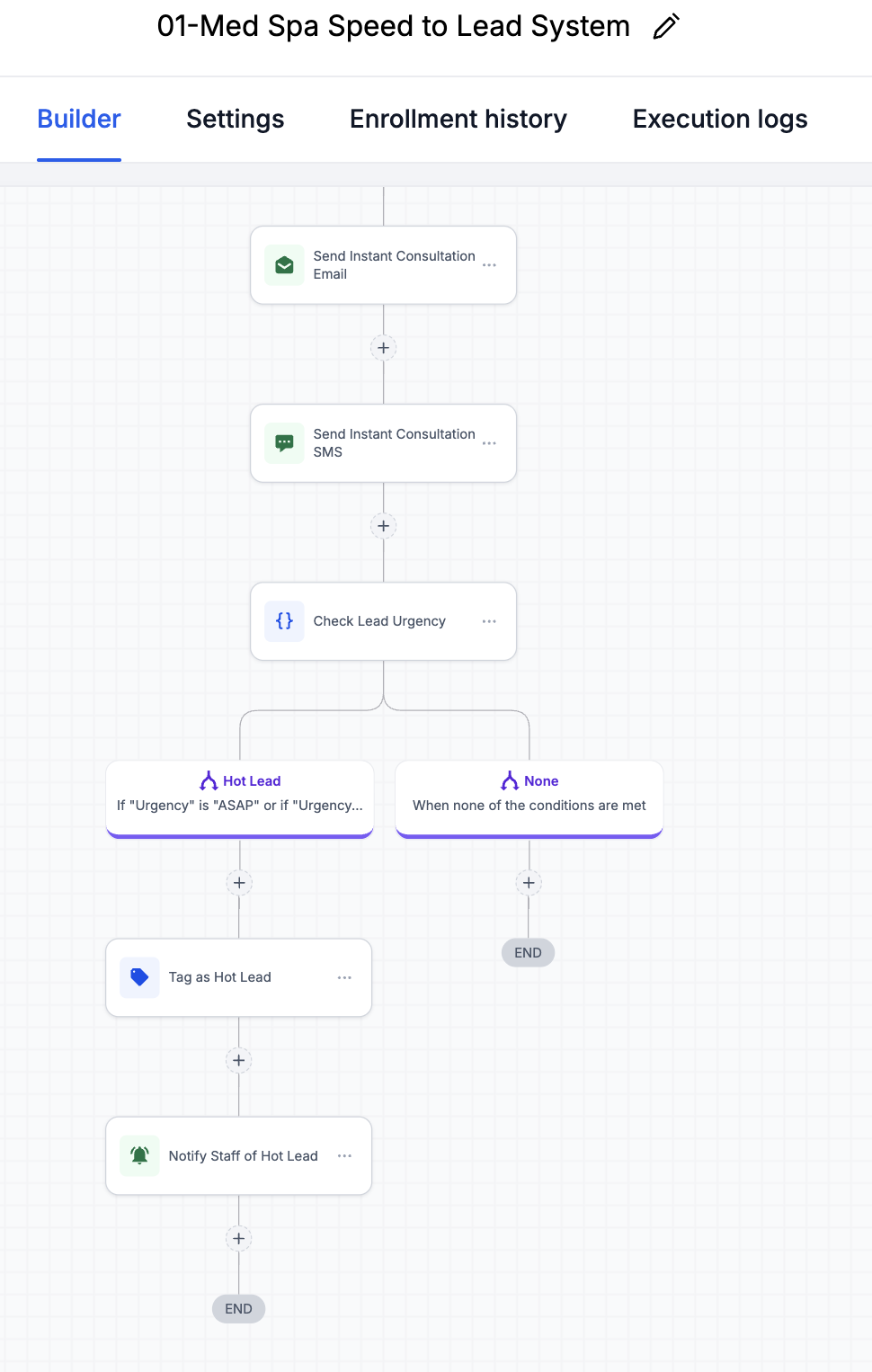
Visible implementation
Shows the immediate email/SMS response and urgency branch for hot leads.
Supporting evidenceOpen full size ↗
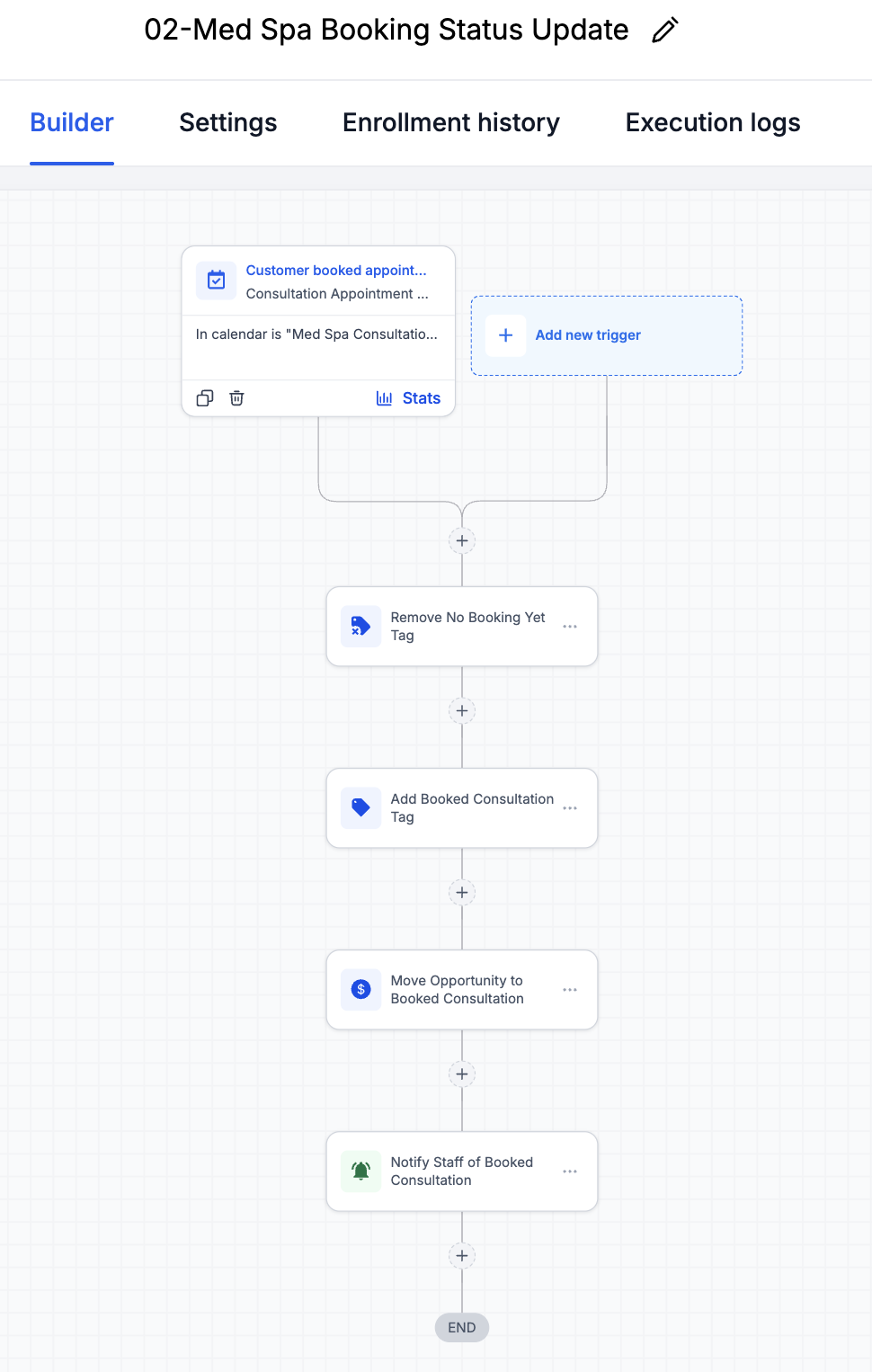
Visible implementation
Proves booked appointments update tags, pipeline status, and staff visibility.
Visible checks
- Booked tag applied
- Pipeline stage updated
- Staff notification visible
04.3
No-booking recovery and manual handoff
Inspect decisions and requirements
No-booking recovery
Follows up with leads who submitted interest but did not schedule, then flags remaining leads for manual review.
What this proves
The workflows handle immediate follow-up, urgency tagging, booking status updates, and no-booking recovery.
Primary evidenceOpen full size ↗
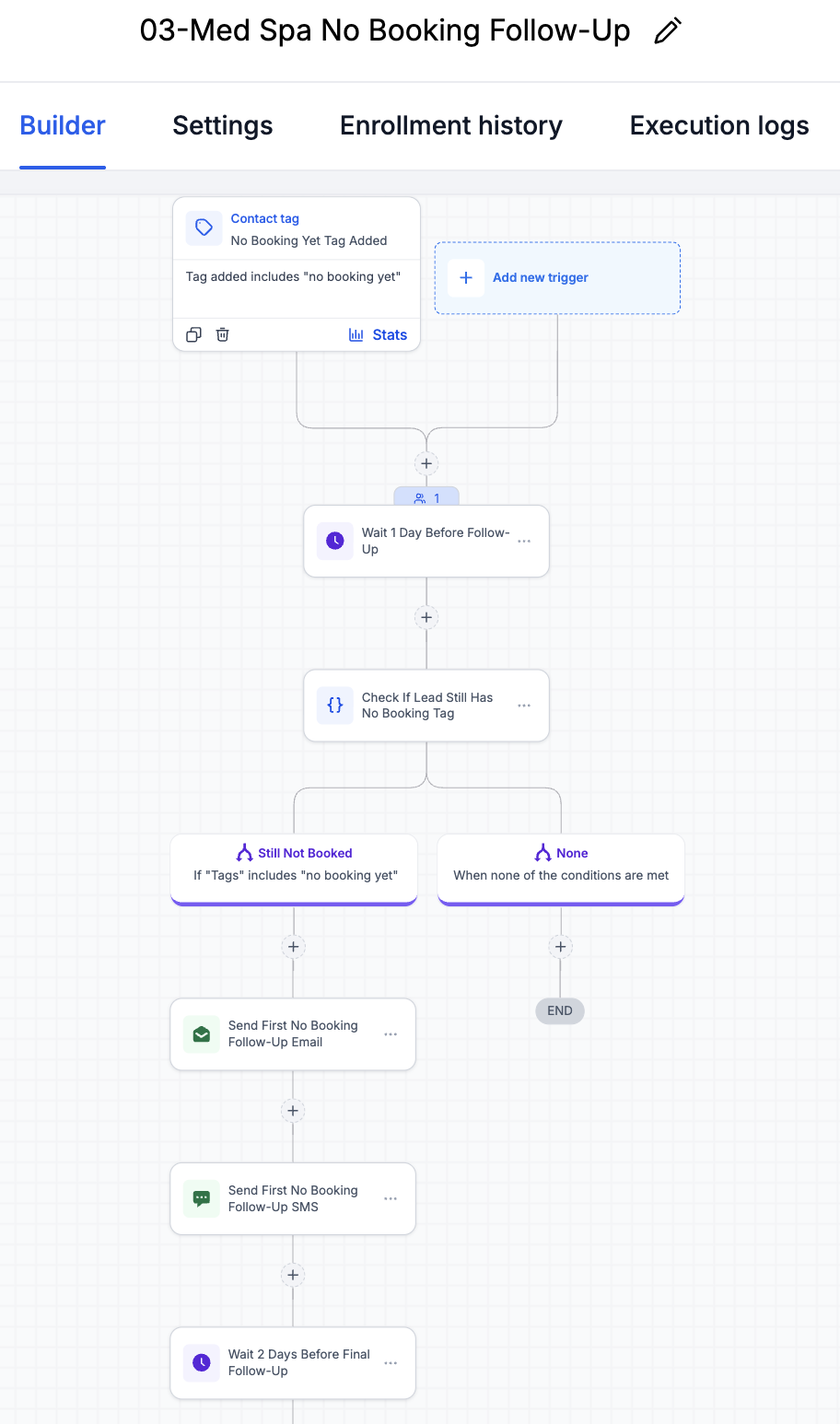
Visible implementation
Shows the recovery path only continues when the lead still has no booking.
Supporting evidenceOpen full size ↗
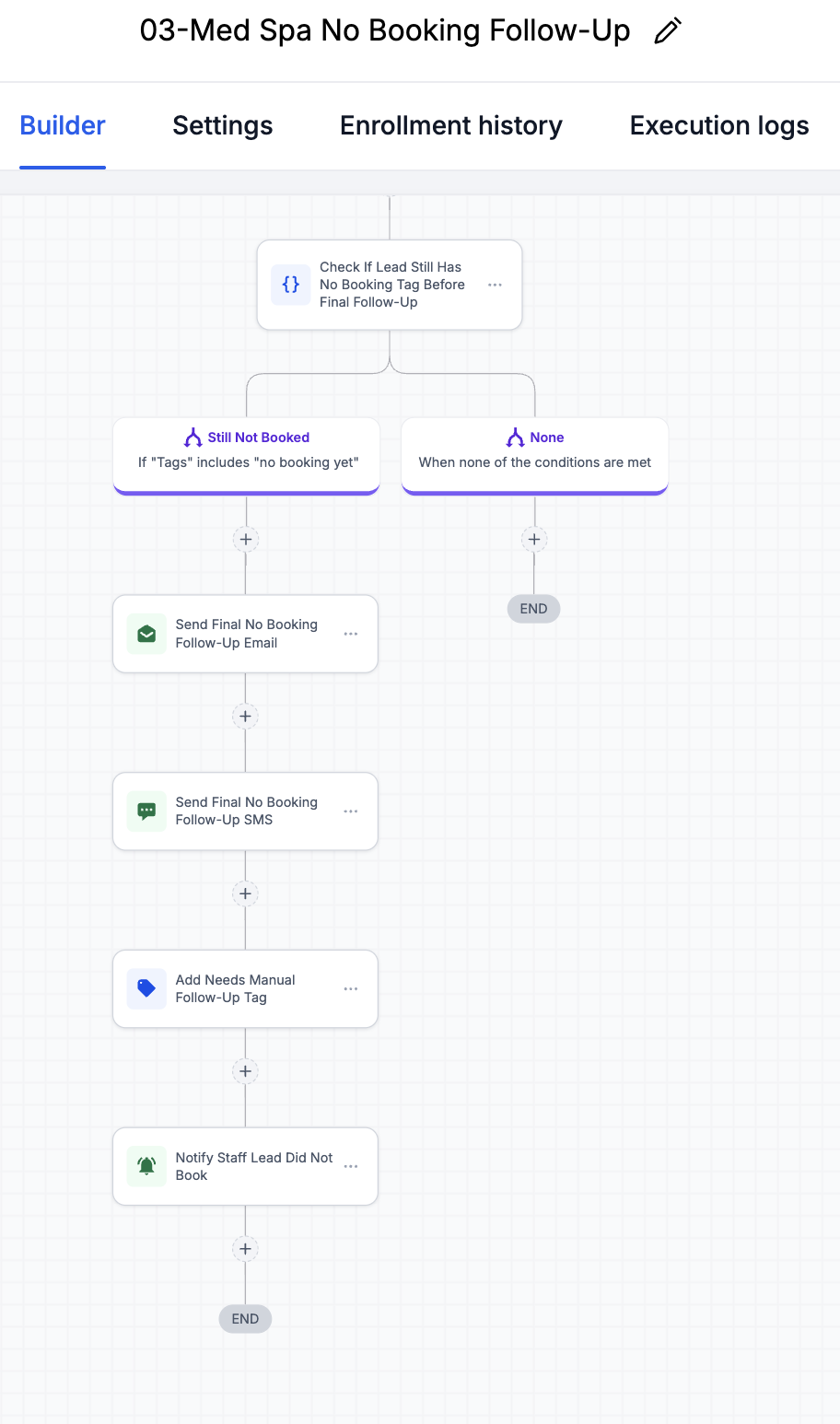
Visible implementation
Shows the final follow-up and manual review flag for unresolved leads.
05
QA and validation
Tested states, expected outcomes, and honest boundaries.
QA used a sample contact record to validate the form-to-booking path, CRM state changes, and staff-visible outcomes. The matrix separates tested behavior from live timing and segmentation validation, plus planned analytics.
QA scenario matrix
Med Spa QA checklist
01
Booking form path and consultation redirect checked
Tested with sample record02
Calendar and appointment state checked
Tested with sample record03
Missed/no-booking follow-up branch reviewed
Logic reviewed04
Staff notification and booking pipeline movement checked
Tested with sample record05
Message timing and service-specific segmentation
Needs live validation06
No-show analytics and conversion tracking
Next improvementThis is sample/test lead data used to QA the portfolio-built booking workflow.
- Record name
- Ava Parker - sample contact
- Inquiry source
- Consultation request form
- Service interest
- Sample med spa treatment interest
- Appointment status
- Booked Consultation
- Follow-up tag
- Booked consultation / no-booking removed
- Staff notification
- New and booked lead notifications reviewed
- Next follow-up
- No-show and rebooking logic would be added next
Expected pipeline movement
These stages show intended CRM state movement for a sample consultation lead.
- 1New InquiryForm submitted and lead created
- 2Appointment RequestedCalendar path presented
- 3BookedBooking status workflow updates CRM
- 4Missed / No-Show Follow-UpNext improvement for live use
- 5Rebooked or NurtureFuture branch for ongoing follow-up
Validation artifacts
CRM proof / QA test
QA testing used a sample contact named Ava to confirm that contact records, tags, activity, and pipeline status updated correctly.
Primary QA evidenceOpen full size ↗
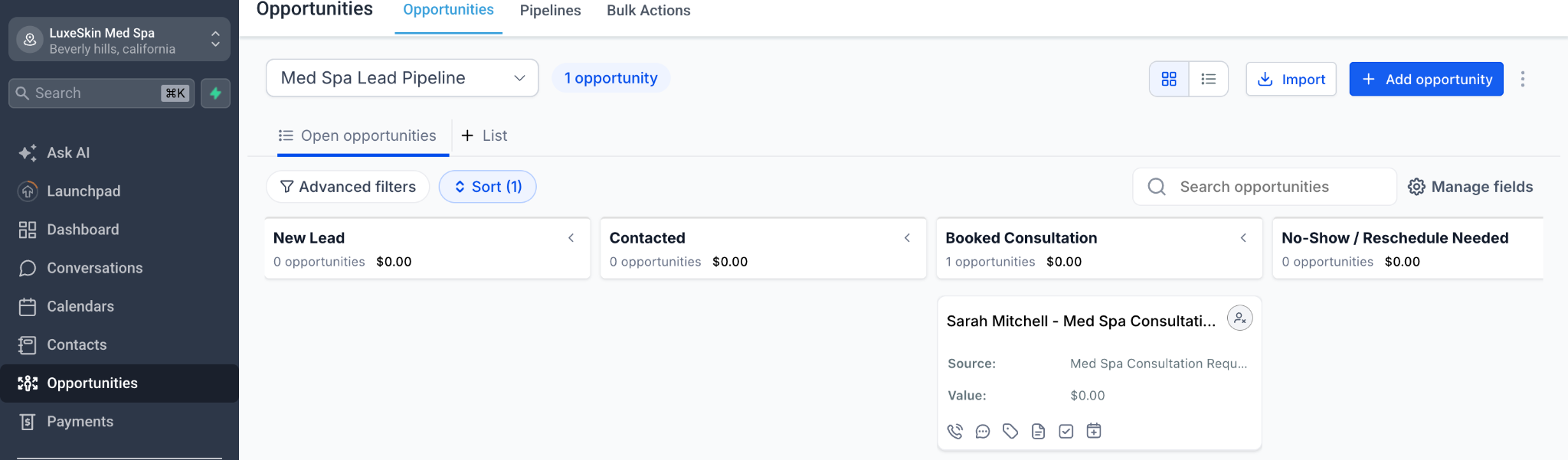
Visible implementation
Proves the sample opportunity moved into the Booked Consultation stage.
Visible checks
- Sample opportunity
- Booked consultation state
- CRM pipeline proof
Supporting QA evidenceOpen full size ↗
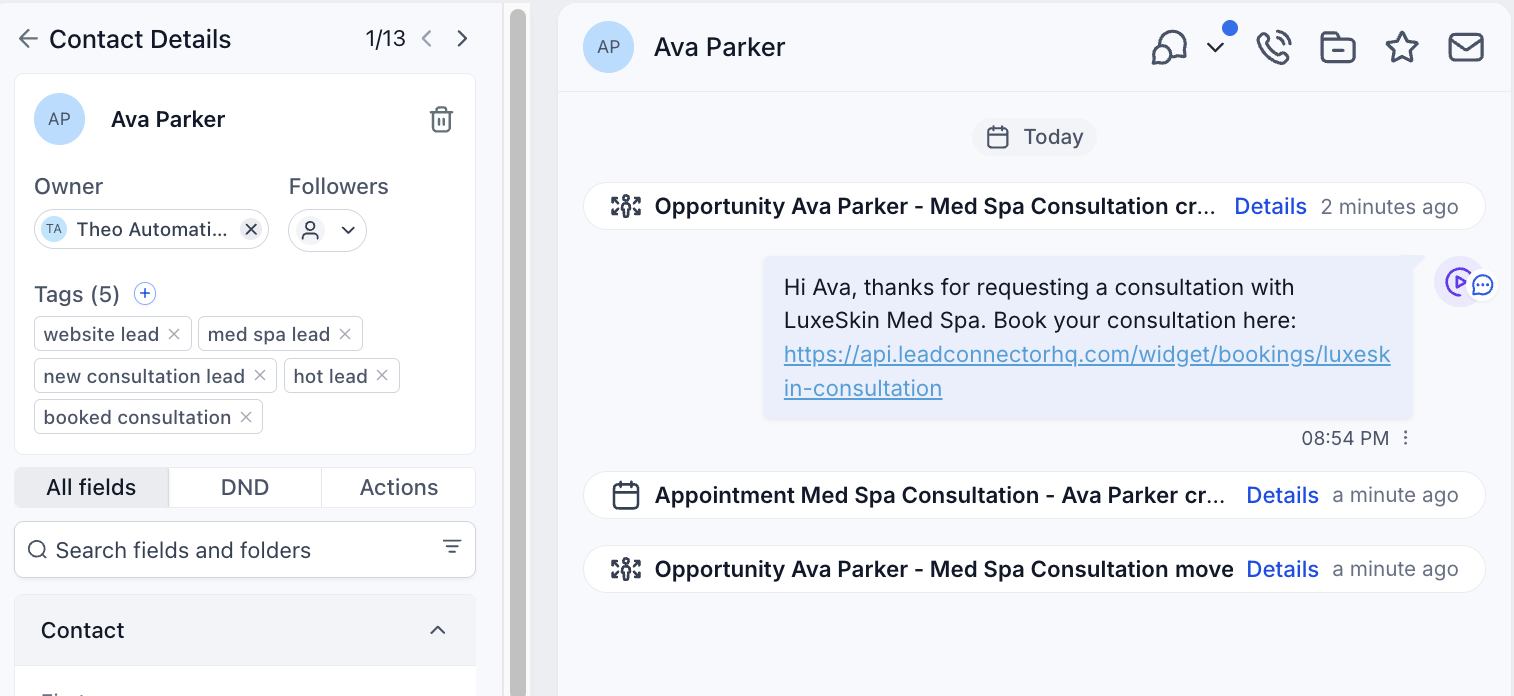
Visible implementation
Shows the sample contact record with tags and booked-consultation context.
Visible checks
- Sample contact record
- Booking status visible
- Follow-up tags present
Supporting QA evidenceOpen full size ↗
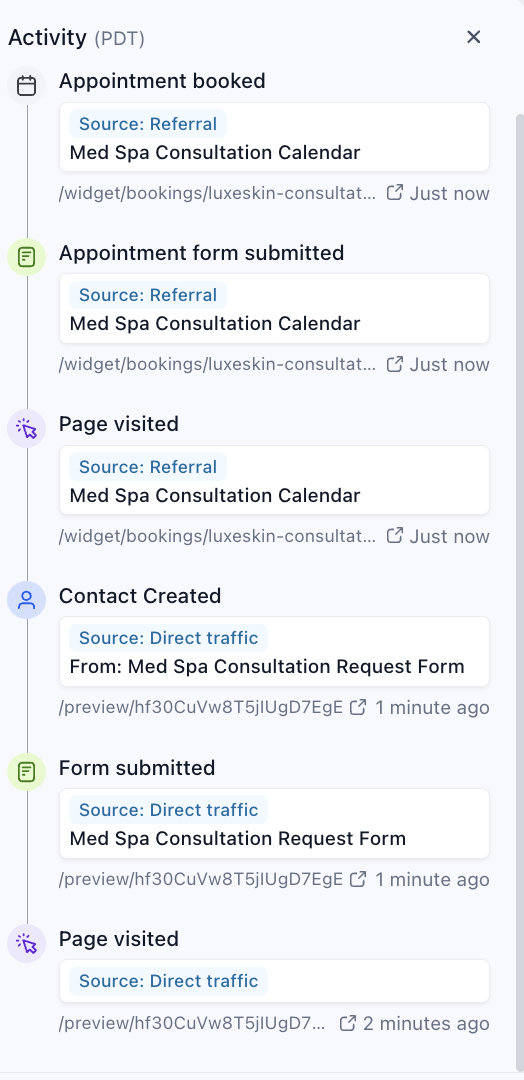
Visible implementation
Proves the QA path recorded page visits, form activity, and booking events.
06
Outcome and reflection
Implemented scope, operating value, and next production steps.
This system is designed to reduce the gap between inquiry and response, make booking status visible to staff, and give non-booked leads structured follow-up instead of relying on manual tracking.
- Capture consultation interest
- Redirect leads to a booking calendar
- Send immediate email/SMS follow-up
- Update tags and CRM pipeline status
- Recover leads who do not book
- Project type
- Portfolio / demo automation build
- Status
- QA-tested with sample contact
This page shows build proof and QA evidence, not live client performance results.
What I would improve next
The core flow is intentionally simple. These additions would make it stronger before and after live med spa use.
- Add no-show analytics and rebooking follow-up
- Segment follow-up by treatment interest and urgency
- Track calendar conversion from inquiry to booked consultation
- Monitor staff response time for high-intent leads
- Add completed-appointment review/referral automation after the booking flow is validated